
Allowed IPs
Allowed IPs lets you decide which internet addresses can sign in to your account or use your API keys. Everything else is blocked. Use it to make sure your account is only used from your shop, office or servers.
An IP address is the number your internet connection shows to the websites you visit, like 203.0.113.24. Your office Wi-Fi usually has one fixed IP address.
Needs an Enterprise plan
IP allowlisting comes with Enterprise plans. On other plans the page says Your plan does not include allowed IPs, with an Upgrade plan button, and the Allowed IPs tile in Settings shows Upgrade. Trial accounts do not get it, so nobody can lock themselves out while trying the app.
Add an IP address
Open Allowed IPs
Open Settings (the gear icon in the left sidebar or the top bar) and click Allowed IPs. At the top you see Your current IP, and whether it is on the list.
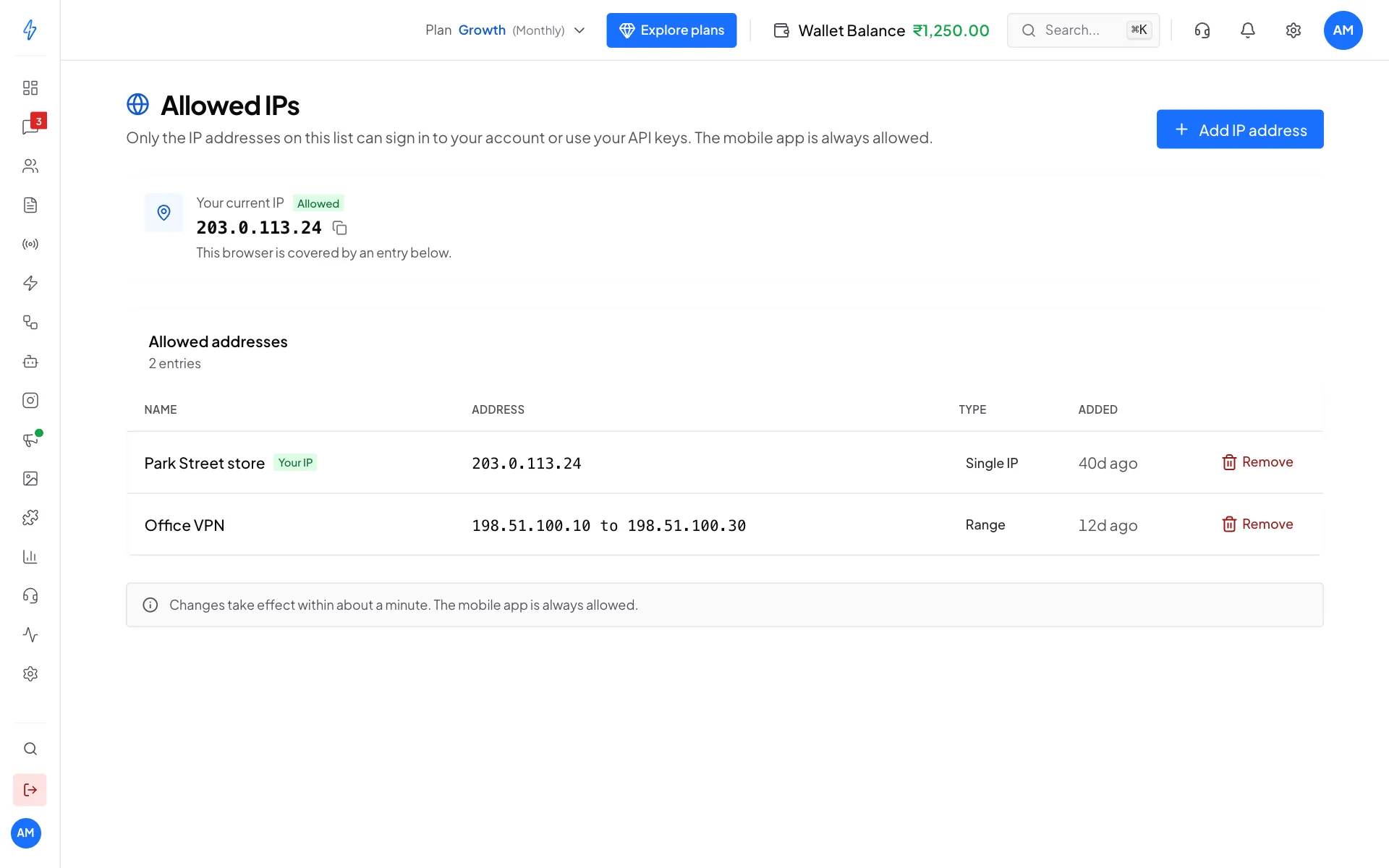
Your current IP and your allowed addresses Add your own IP first
If your current IP says Not on the list, click Add my IP. Always add your own address first, so you do not block yourself.
Click Add IP address
Click Add IP address at the top right. Pick the Type:
- Single IP: one fixed address, like an office line.
- IP range: every address from one to another. Fill in From and To.
Type the address and a name
Type the IP address (or click Use this IP to fill in the one you are on). Give it a Name so you can tell entries apart, like
OfficeorWarehouse. Click Add IP address.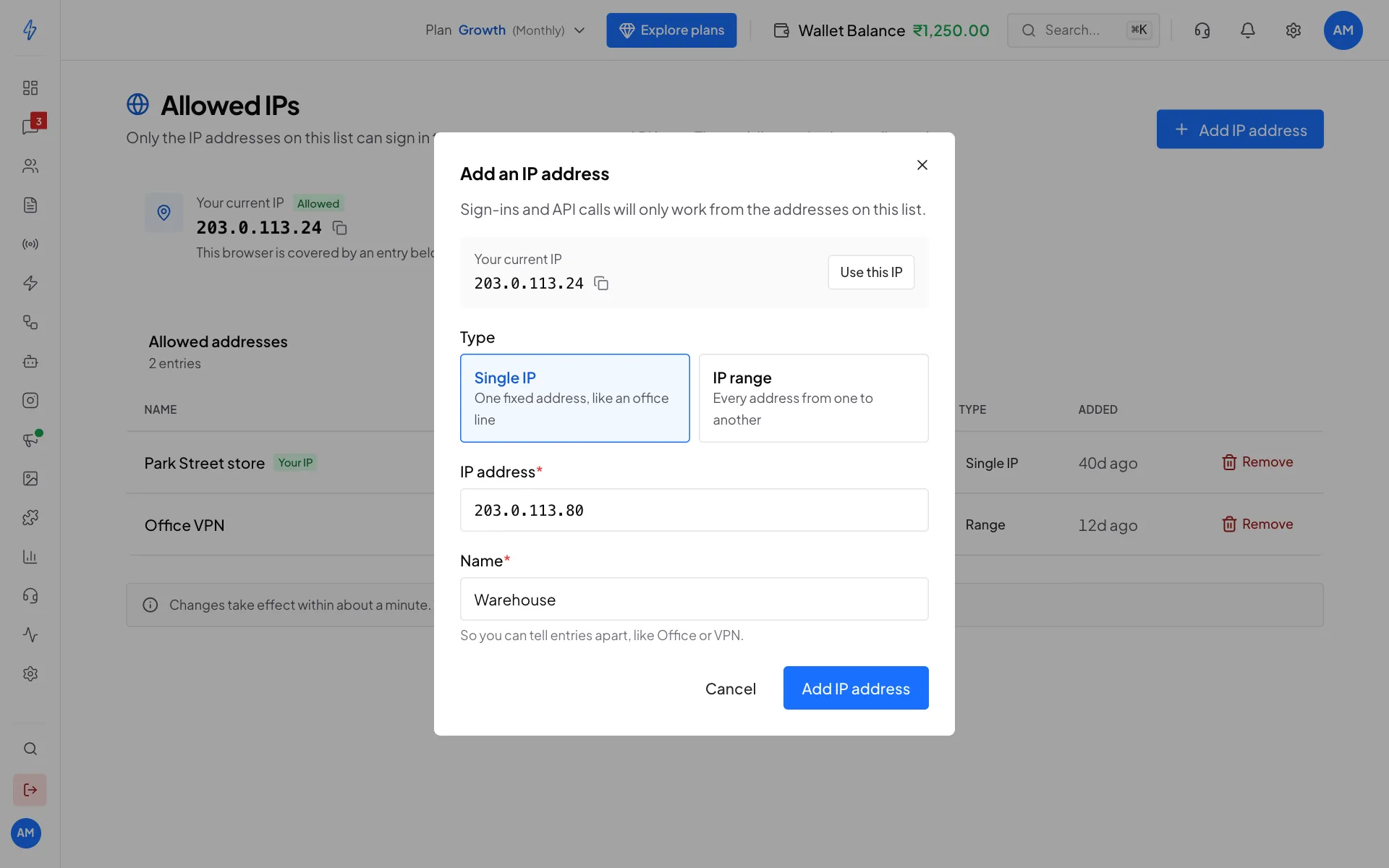
Add a single address with a name
You will see IP address added. From now on, only the addresses on your list can sign in.
To take an address off the list, click Remove on its row and confirm. If you remove the last entry, the list turns off and every IP can sign in again.
What gets checked
The mobile app is not checked because phone networks change their IP address all the time.
Example entries
Office HQ            203.0.113.24
Office VPN           198.51.100.10  to  198.51.100.30
Each entry needs a Name of up to 80 characters.
When changes take effect
Changes take effect within about a minute. Add an entry, wait a minute, and the next sign-in from that address works. Removing an entry takes the same time.
The Allowed IPs page itself is never blocked by the list. If you add a wrong address and get locked out of other pages, you can still open Settings, then Allowed IPs, to fix it.
An empty list blocks nothing
If you have not added any entries yet, nothing is blocked. We treat an empty list as "everyone allowed", so turning the feature on can never lock you out by itself. The first entry you add switches the check on straight away.
What a blocked person sees
In the web app
The page is replaced by a block screen that shows the address that was refused, with Refresh and Log out buttons. No data loads on that screen.
API calls
A call to /api/v1/public/* or /api/v1/graphql from an address not on the list gets HTTP 403:
{
  "success": false,
  "code": "ip_blocked",
  "ip": "203.0.113.45",
  "message": "Access denied. Your IP address is not on this account's allowlist."
}
Blocked calls do not count against your rate limit, so a program that keeps retrying cannot use up your quota.
Email alerts
The first time an address is blocked on a day, the account owner gets an email:
Subject: Blocked login attempt from a new IP

Hi <name>,
We just blocked an access attempt from 203.0.113.45.
If you recognise it, add it from Settings → Allowed IPs.
More blocks from the same address in the next 30 days do not send more emails. After 30 days, a new block sends a new alert.
Limits
- Up to 50 entries per account, single addresses and ranges together.
- IPv4 addresses only (like
203.0.113.24). IPv6 is not supported yet. If Your current IP shows an IPv6 address, turning the list on will block that connection.
Errors and how to fix them
For developers: the mobile app
The Splashify Pro mobile apps, and custom apps built with our Expo SDK, send an X-Platform header (ios, android, mobile or expo). The IP check is skipped for these, so people on phone networks are not locked out when their address changes.
This does not apply to the public API. API keys (sk_live_…), SMTP passwords and GraphQL tokens are always checked, whatever headers are sent.
Good habits
- Check your list every few months. Remove old office, VPN and server addresses you no longer use.
- Keep ranges small. A range for one office network is fine. A very wide range makes the list pointless.
- Combine it with team access. Give each team member only the pages they need.
- Keep the mobile app installed. If you type a wrong address and get locked out, you can still use the app on your phone to fix it.