
Wallet and billing details
Your wallet is the prepaid balance that pays for each message you send. Your billing details are the business name, address and GST number printed on your invoices. Fill in your billing details first, because we need them before you can pay.
Fill in your billing details
For accounts in India. For an account outside India, see Billing details.
Open Billing details
Open Settings (the gear icon in the left sidebar or the top bar) and click Billings. If your address is missing, a yellow box says Add your billing address.
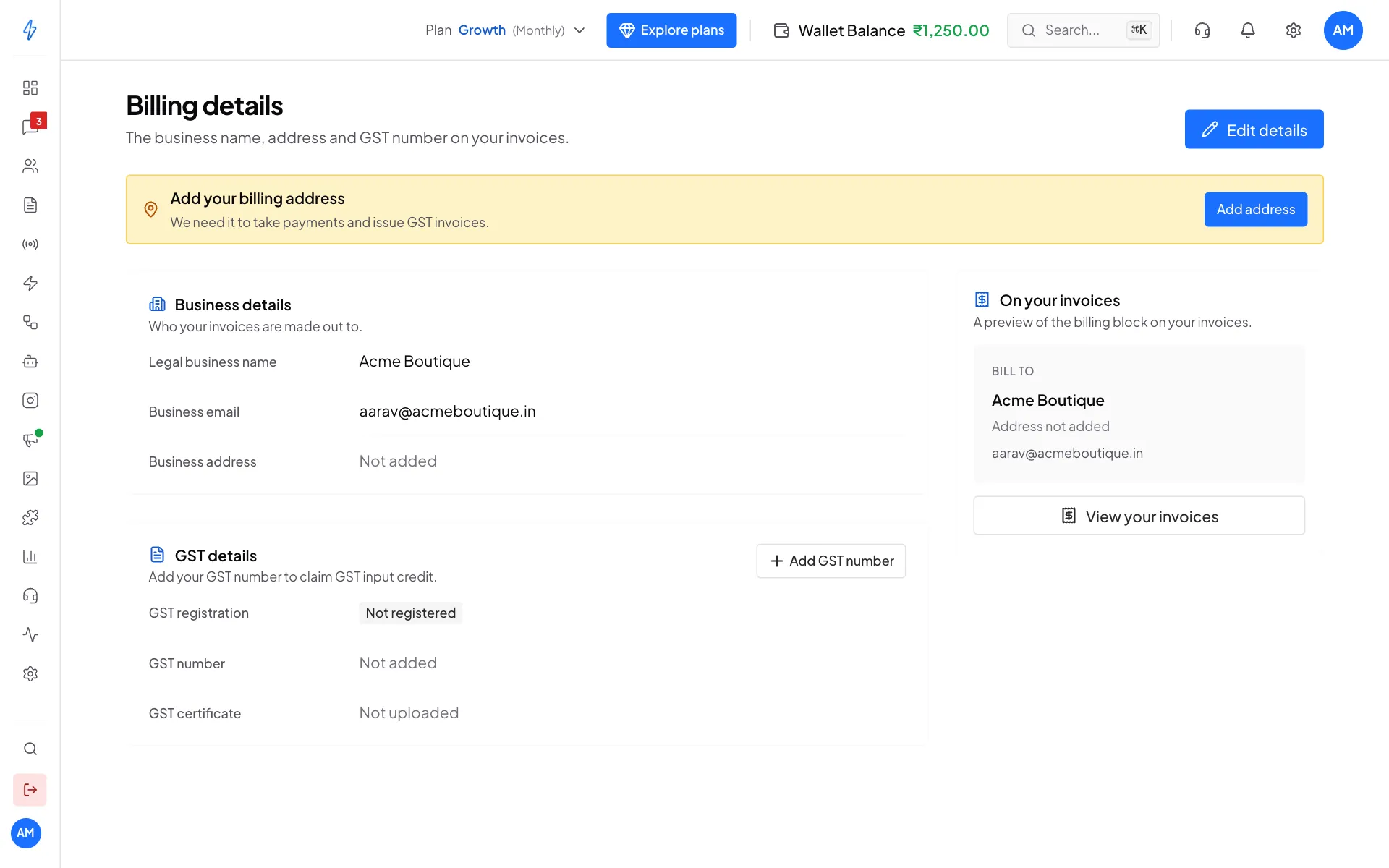
Billing details with no address yet Click Edit details
Click Edit details at the top right (or Add address in the yellow box). The Update billing details form opens.
Say whether you have a GST number
Under Do you have a GST number?, click Yes, I have a GST number or No GST number. Without a GST number you cannot claim GST input credit on your invoices.
Type your GST number
Type your 15-character GST number in GST number. As soon as you type the last character, we look it up in the government GST records. A green box shows your registered business name, and the form below fills itself in.
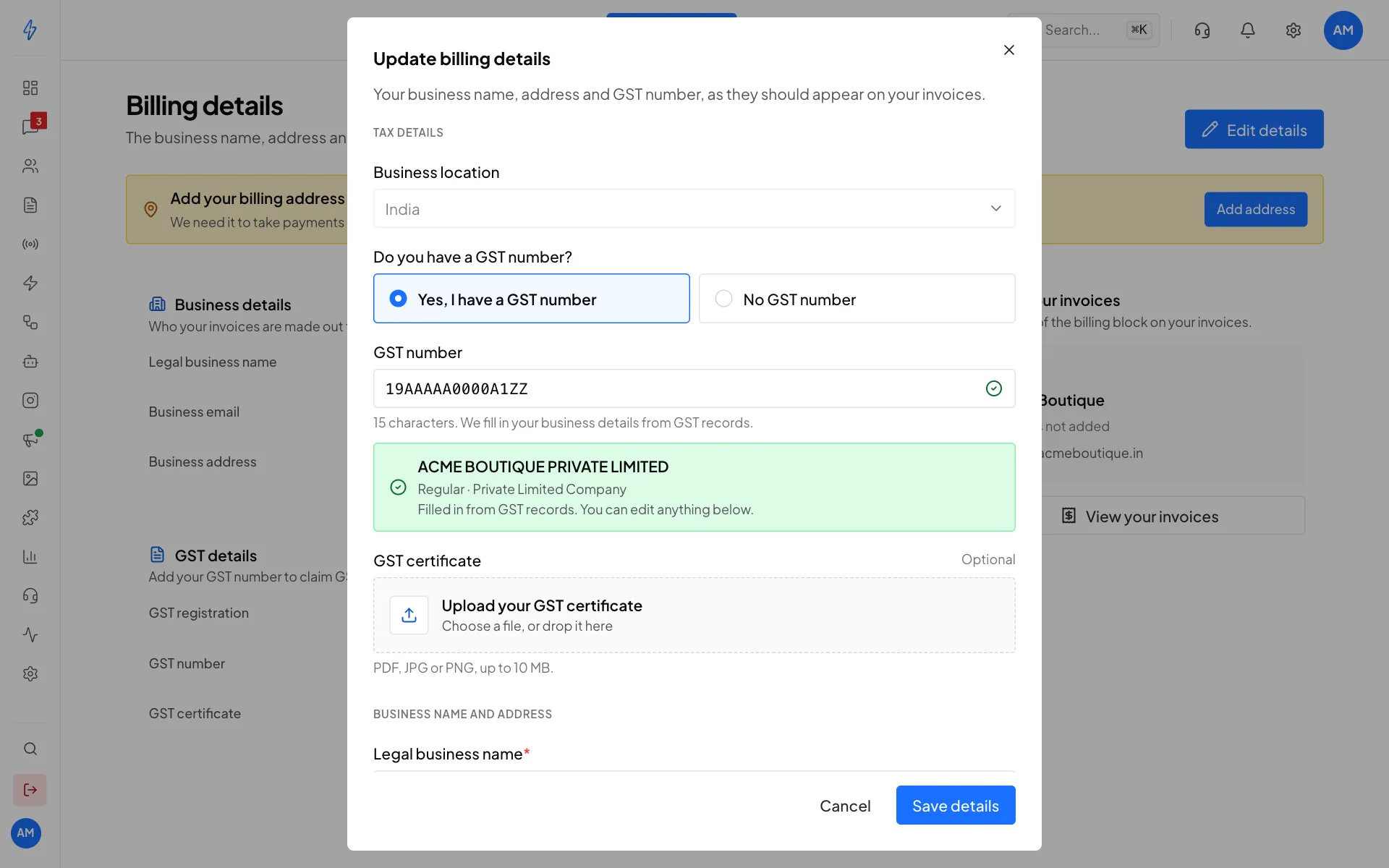
Your GST number fills in your details Check your name and address
Scroll down to Business name and address. Check Legal business name, Address line 1, Address line 2, City, State and PIN code. Everything can be changed. If you bill from a different address, just type over it.
You can also upload your GST certificate (PDF, JPG or PNG, up to 10 MB). It is optional.
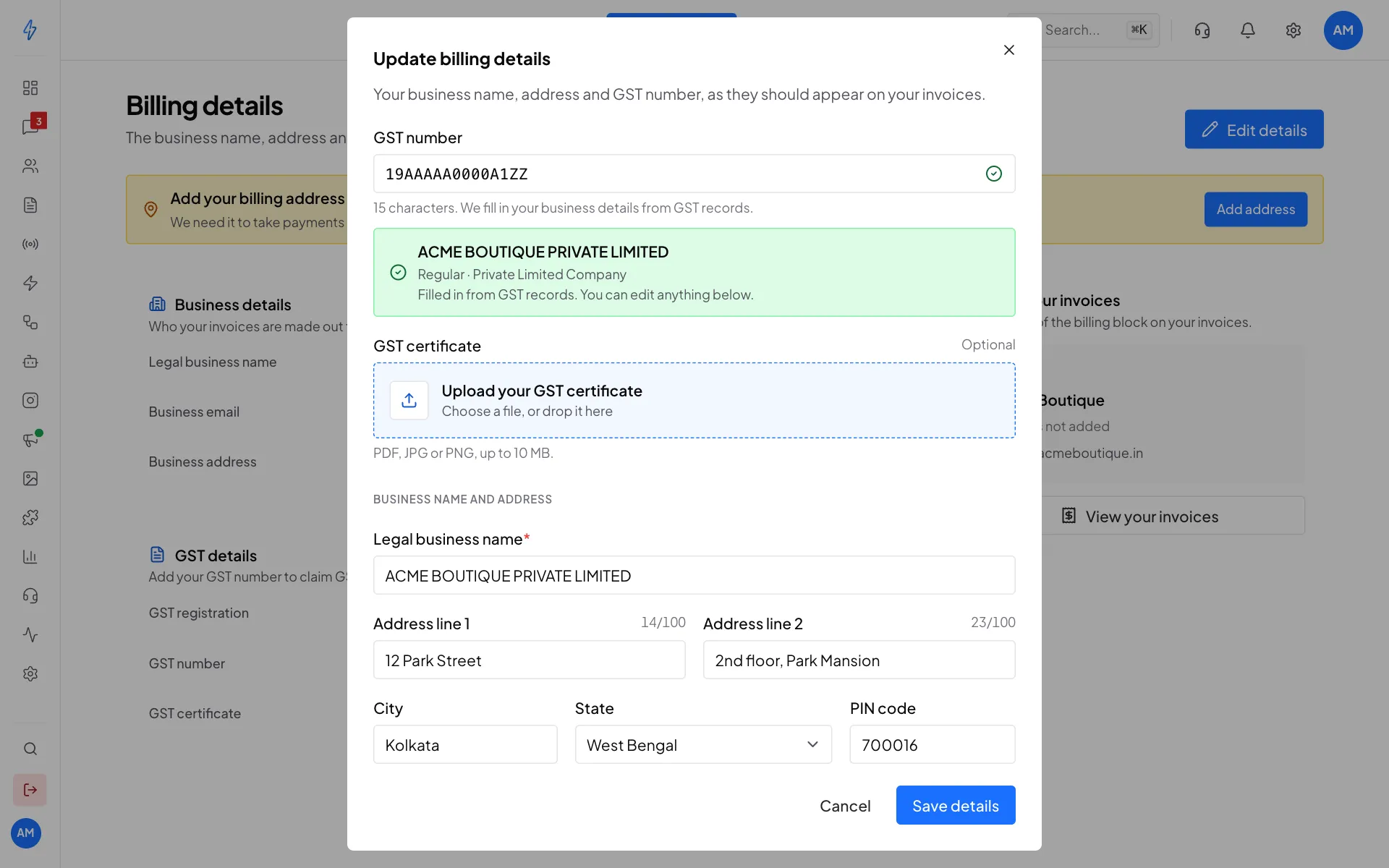
Check the name and address, then save Save
Click Save details. You will see Billing details saved. The page now shows your Business details, GST details, and on the right a preview of how the billing part of your invoices will look (On your invoices).
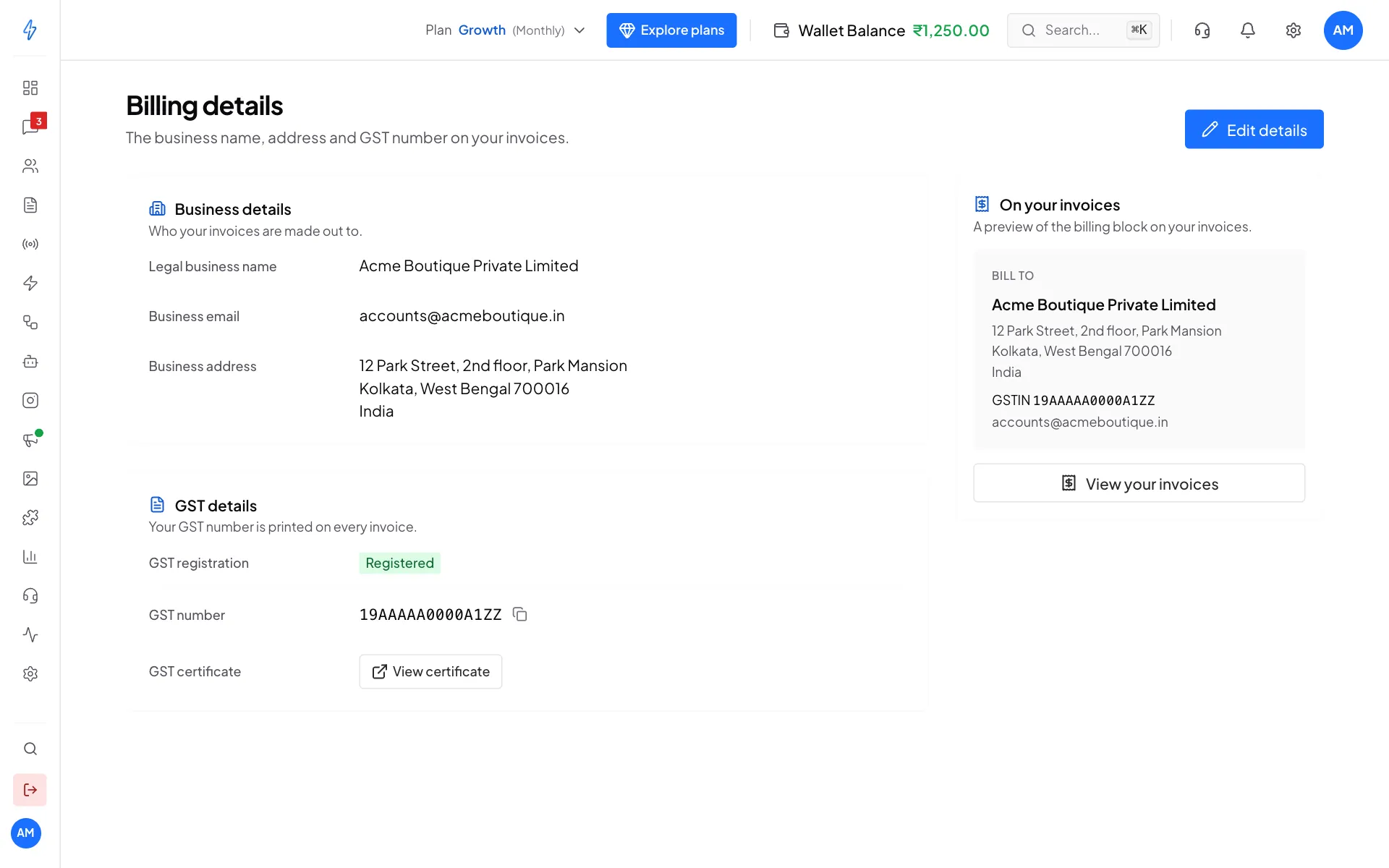
Saved. New invoices use these details.
Good to know about the GST lookup
- Your invoices should match the GST records. A name or state that differs from your registration is the usual reason an input tax credit gets questioned later.
- Where the form already has something in it, the lookup leaves it alone and shows Use the details from GST records instead. Click it to copy the registered details in.
- Nothing is blocked if the lookup finds nothing. A GST number registered in the last few days may not be published yet. The number is still checked, and you can fill in the rest by hand.
- If your registration is not active, we say so rather than filling the form quietly. Cancelled and suspended registrations cannot claim GST benefits.
Your wallet
There are two prepaid balances, and they are kept apart on purpose.
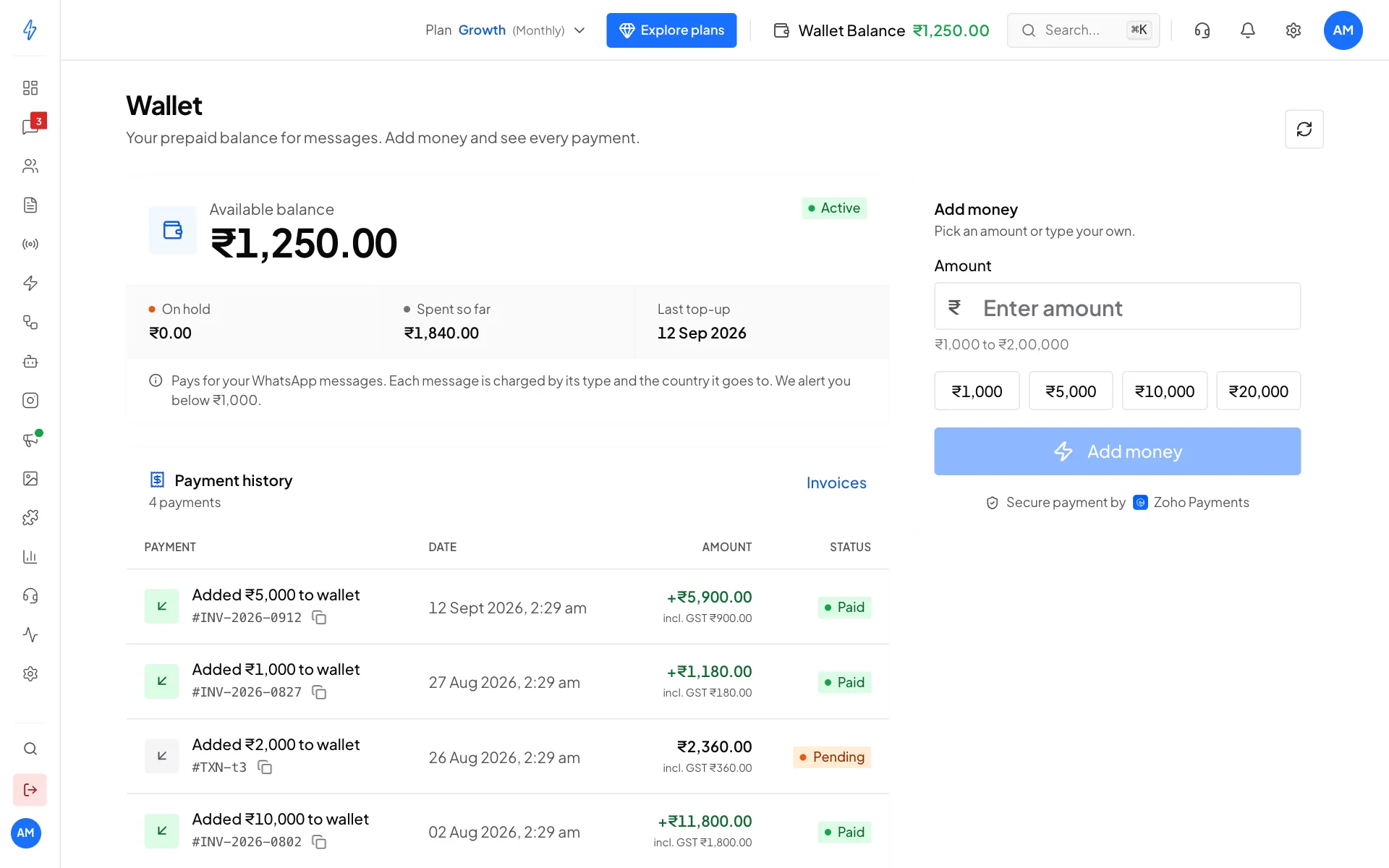
Main wallet pays for:
- WhatsApp message costs (one final price for each type of message, shown before you send)
- RCS message costs
- WhatsApp calling (per minute)
- All AI usage: chat agents, voice agents, template and flow generation, ad copy, lead scoring and AI ad images
Advertisement Credits pays for one thing only: campaigns run for you through Managed Ads. Ad spend is never taken from the main wallet, so a campaign can never eat into your messaging balance. If Advertisement Credits run out, the campaign pauses. It does not fall back to the main wallet.
To top up Advertisement Credits, open Settings and click Ad Credits, or click Recharge on the Advertisement Credits card on your dashboard.
Check your balance
Your wallet balance is always shown next to Wallet Balance in the top bar. Click Wallet Balance to open the Wallet page. Click the amount itself to see where the money went (Track Expenses).
Add money to your wallet
The amounts, GST and ways to pay below are for accounts in India. For an account outside India, see Paying.
Open the Wallet page
Click Wallet Balance in the top bar.
Pick an amount
Under Add money, click an amount such as ₹5,000, or type your own in Amount (from ₹1,000 to ₹2,00,000). The box below shows the Top-up, GST (18%), You pay and your New balance.
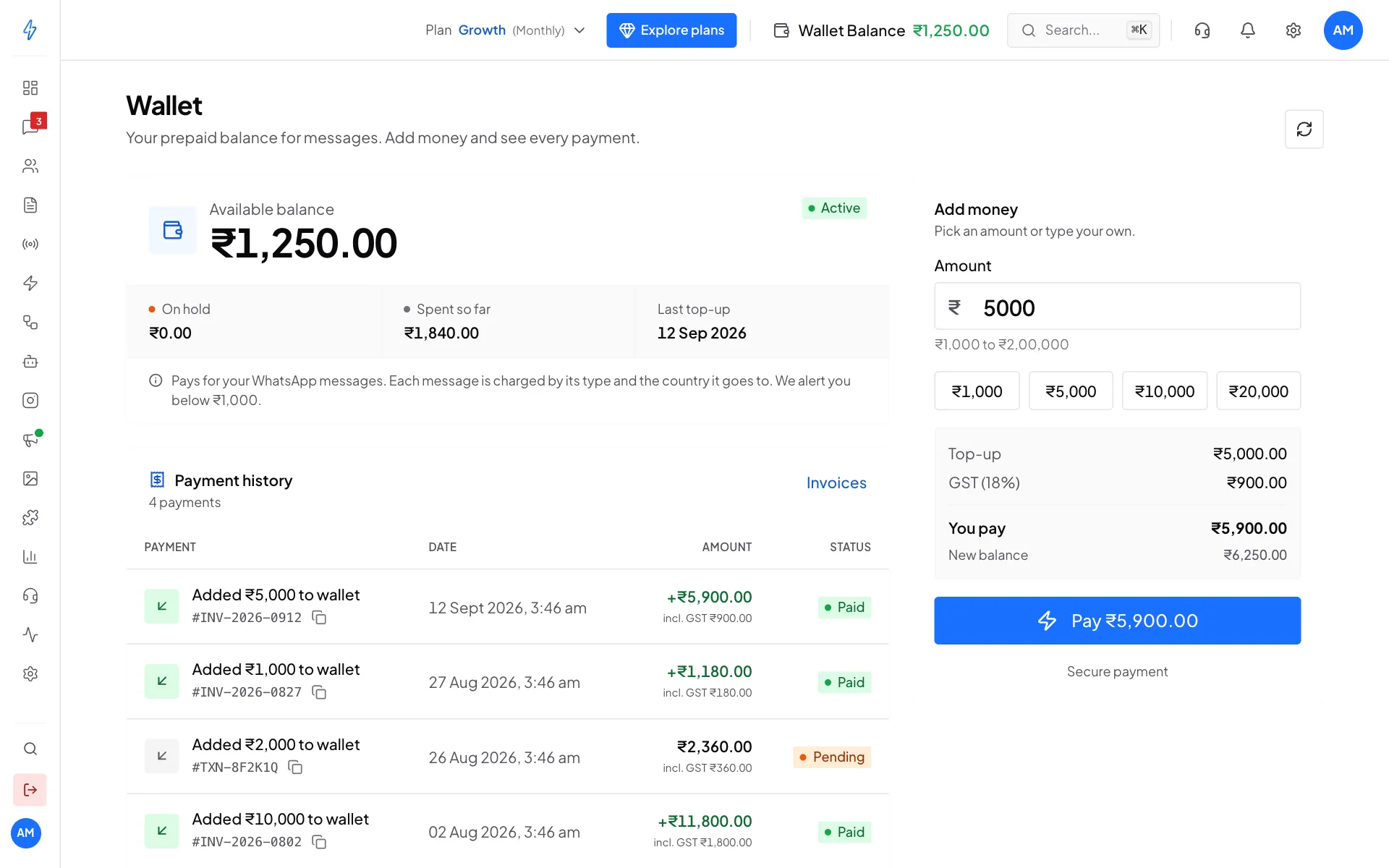
Check the total and your new balance Pay
Click Pay (the button shows the total). A secure payment window opens where you pay by UPI, card or net banking.
Done
You will see Payment done and your balance goes up straight away. The payment shows under Payment history with its invoice number.
GST on wallet top-ups
18% GST is added to every top-up. Only the top-up amount goes into your wallet, and the GST shows on your invoice.
Payment history
The Payment history list on the Wallet page shows every top-up with its invoice number, date, amount (including GST) and status: Paid, Pending or Failed. Click Invoices to download the invoices.
Auto-recharge
For accounts in India that pay in rupees. It is not offered outside India yet, see Not available in your country yet.
Auto-recharge adds money to your wallet by itself when your balance goes below an amount you choose, so your messages keep sending. You approve it once with your bank. Adding money by hand with Add money works as before.
Turn on auto-recharge
Open the Wallet page
Click Wallet Balance in the top bar. The Auto-recharge card is under Add money. The same card is also in the recharge panel that opens from your dashboard.
Turn it on
Click the switch next to Auto-recharge.
Set the two amounts
In When the balance goes below, type the balance at which a top-up starts, for example ₹500. In Add, type how much to add each time, for example ₹5,000. The hint under each box shows the amounts you can use. A line then sums it up: Auto-recharge of ₹5,000 will start when your balance goes below ₹500.
Click Save
The first time, a box says that your bank asks you to approve auto-recharge once. Click Approve ₹1.
Approve ₹1
A secure payment window opens. Approve the payment of ₹1 with your UPI app or your card. This one approval is what lets later payments happen by themselves.
Done
The card says Auto-recharge is on. It shows how you pay (for example UPI and part of your UPI ID) and your Last payment: Waiting for your bank, Added or Failed, with the time.
If you close the payment window or the ₹1 does not go through, nothing is turned on. The card says so, and you can click Save to try again.
One approval covers your wallet and your ad credits. If you already approved it for one of them, the other usually turns on as soon as you click Save.
What to expect
- Your bank tells you first. Before each automatic payment, your bank sends you a notice, so the money is added about a day after your balance goes below your amount. Keep the "below" amount a little higher so your balance never runs out while you wait.
- Above ₹15,000, your bank asks you to approve each payment. You get the request from your bank or in your UPI app. Up to ₹15,000, payments happen by themselves.
- If a payment does not go through, the card says The last automatic payment did not go through. Check your UPI app or card, then turn auto-recharge on again. Check that your UPI account or card can pay the amount, then click Turn on again.
Change the amounts
On the card, click Change amounts, type the new amounts and click Save. If your bank needs a new approval for the new amounts, the Approve ₹1 box opens again.
Turn off auto-recharge
Click Turn off on the card (or the switch next to Auto-recharge). A box asks Turn off auto-recharge for your wallet and ad credits? Click Turn off. Auto-recharge stops for both your wallet and your ad credits, and no more automatic payments are taken. You can turn it on again any time.
If you used auto-recharge before
Auto-recharge works in a new way now. If you had it on before, the card says We changed how auto-recharge works. Please turn it on again. Click Turn on again, check the two amounts, click Save and approve ₹1.
Low balance alert
When your main wallet drops below ₹500, a box says Your wallet is running low. Click Add money to top up, See where it went to see your spending, or Remind me later. On the Wallet page, the balance turns orange with the note Add money so your messages keep sending once it is below ₹1,000. These amounts are for accounts in India.
Invoices
Every payment makes a GST invoice. To download one, open Settings, then Invoices. See Invoices. Outside India, invoices are in US dollars, with no Indian GST.
Message prices by plan
For accounts in India. For an account outside India, see Message prices.
What each message costs depends on your plan. Bigger plans have lower rates. The plan cards on the plans page show the rates. See Buy or change a plan.
Track expenses
For a day-by-day breakdown of what you spent:
- Open Settings and click Track Expenses (or click the amount next to Wallet Balance in the top bar).
- See your daily, weekly or monthly spend, the cost for each message type (marketing, utility, authentication), trend charts and a line-by-line billing log.