
WhatsApp broadcasts
A WhatsApp broadcast sends an approved template from your business number to many customers at once. This page explains the WhatsApp rules behind it, so your broadcasts keep reaching people. For the step-by-step, see Create a broadcast.
How it works
- You pick an approved template and a group of customers.
- Each customer gets their own copy, from your business number, with their own name and details filled in.
- When a customer replies, a normal chat opens in your inbox, and you have 24 hours to reply freely.
Broadcasts must use templates because WhatsApp only lets businesses start a conversation with an approved template. See About templates.
Template categories
The price per message shows on the last step of a broadcast before you send. Most templates are approved within 24 hours.
How many people you can message a day
WhatsApp limits how many different customers your number can start conversations with in 24 hours. The limit grows as you send good messages.
WhatsApp raises your level by itself when you use most of your limit and your quality stays good. Completing business verification (KYC) unlocks the higher levels. Messages beyond your limit fail, so split a very large list over more than one day if you are near it.
The last step of a broadcast tells you before you send if it is bigger than your limit. See Check before sending.
Keep your quality rating green
WhatsApp watches how customers react to your messages: whether they read them, and whether they block or report you. This gives your number a quality rating: GREEN, YELLOW or RED.
A RED or FLAGGED number blocks broadcasts
If your quality becomes RED or FLAGGED, the Broadcasts page shows Broadcasts disabled. New broadcasts cannot be created and running ones are cancelled until the quality improves.
To stay green:
- Only message people who agreed to hear from you.
- Send things customers expect and want, not the same offer every day.
- Use the customer's name and keep one clear button or link.
- Let people stop marketing easily. See Opt-outs.
When WhatsApp pauses your template
WhatsApp can pause a template for some hours when too many people block or report it, and disable it if that keeps happening. A broadcast on a paused or disabled template is not sent. A waiting broadcast shows as Failed with the reason, and a running one stops and shows as Cancelled, with how far it got in its report. The people it did not reach are not charged. See Check before sending.
When a broadcast pauses
If your wallet runs out in the middle of a broadcast, it stops and shows Paused. A red box at the top says Broadcasts paused: insufficient wallet balance.
Add money
Click Recharge Wallet in the red box and add money to your wallet.
Restart the broadcast
Come back to Broadcasts and click Restart on the paused row. It carries on with the people who have not got it yet. You will see Broadcast restarted.
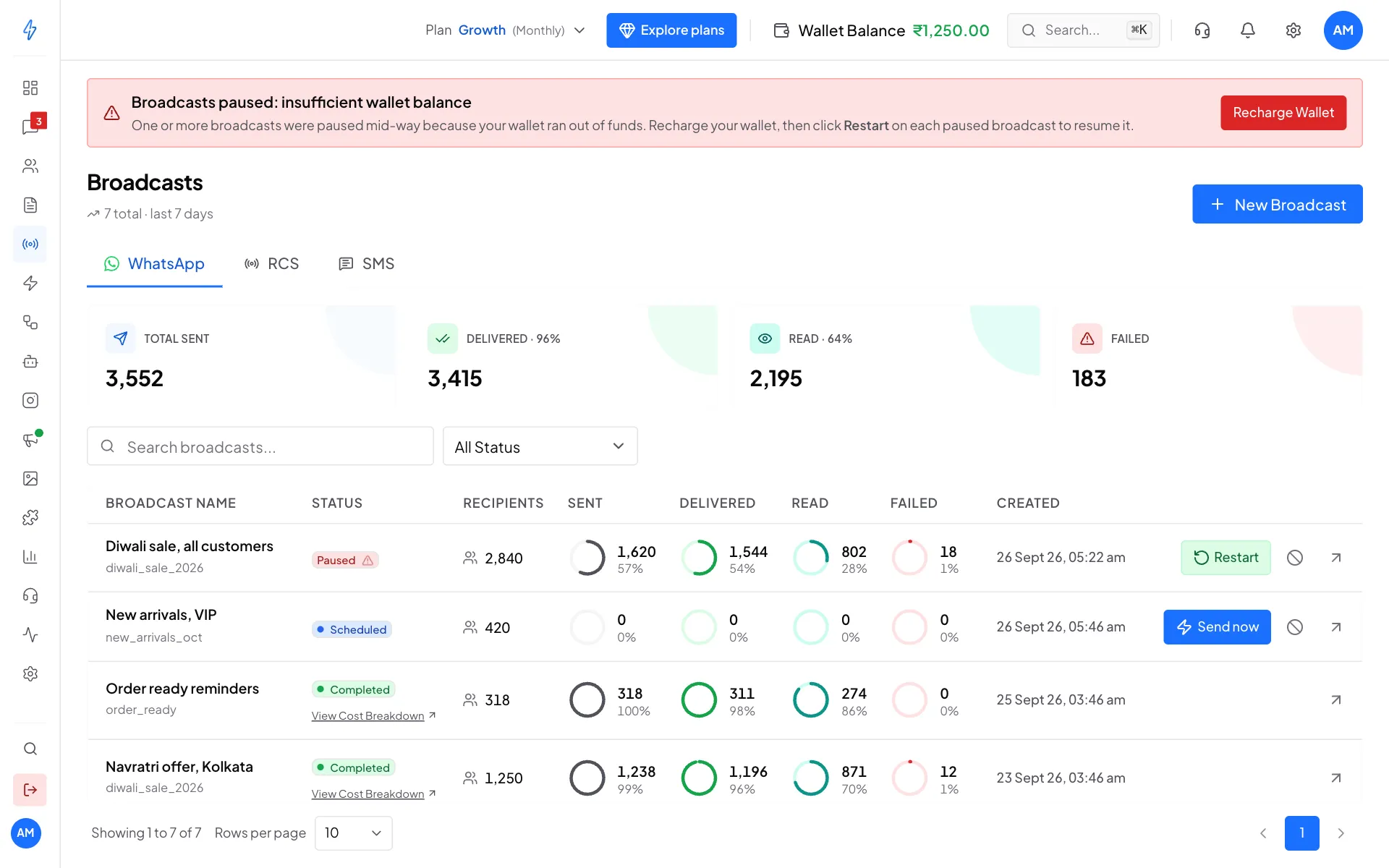
Add money, then click Restart on the paused broadcast
Find a broadcast by status
Open All Status above the list and pick Queued, Scheduled, Processing, Completed, Cancelled or Failed. Type in Search broadcasts... to find one by name.
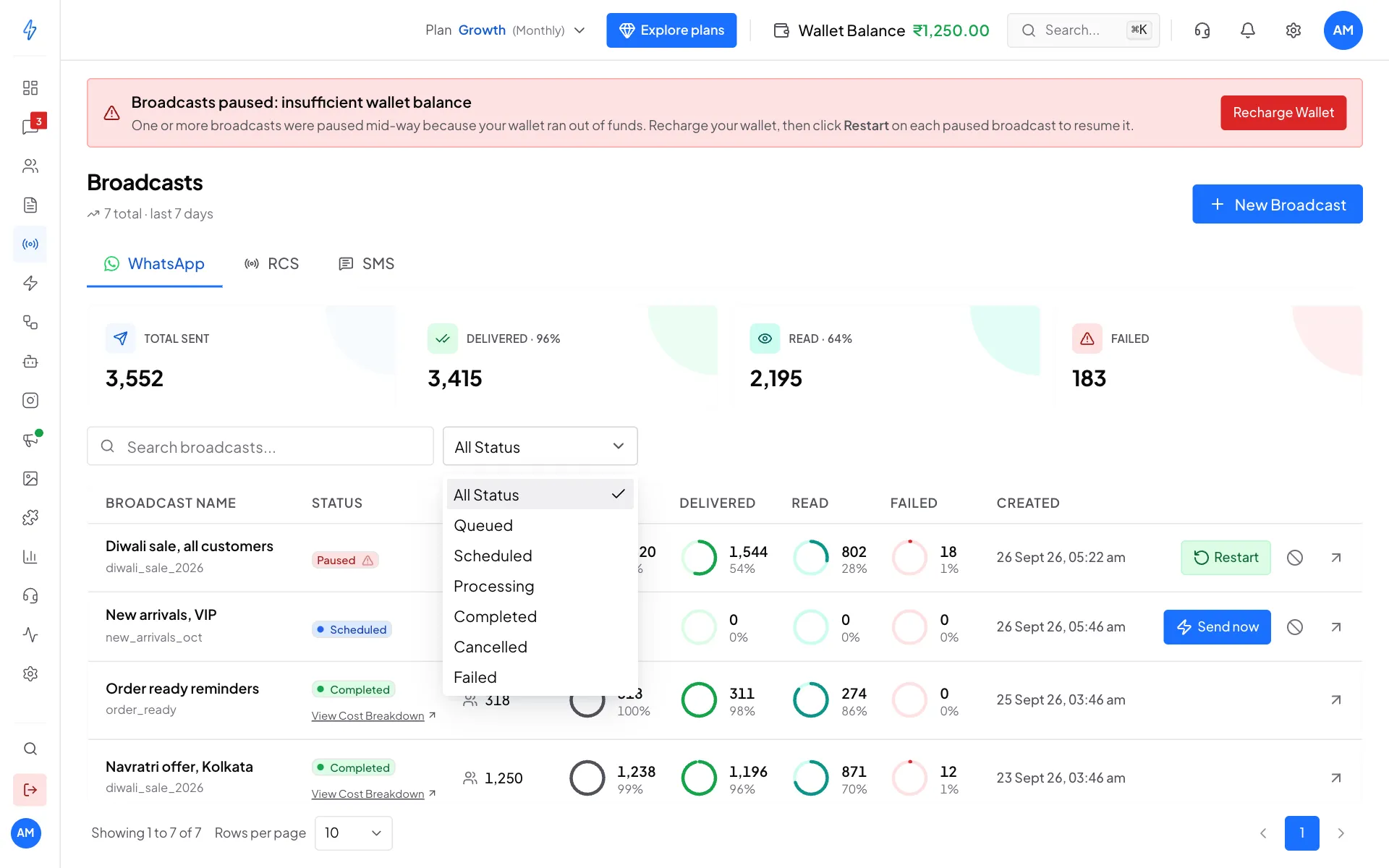
Sending speed
You do not need to do anything about speed. Messages are sent in batches at the fastest rate your number allows, and a large broadcast simply takes a little longer. The report shows when it started, when it finished and how long it took.
A number you also use in the WhatsApp Business app on your phone sends more slowly: WhatsApp lets such a number send fewer messages each second. A large broadcast from it takes longer, but every message still goes out.