
Markup Settings
Available for accounts in India.
Markup is the extra you add on top of your cost for each message, minute or email your clients use. Your wallet pays your cost as they use it, and the markup is your profit.
To open this page, click Markup in the left menu.
Your cost:      ₹0.1500 per Promotional RCS message
You charge:     ₹0.2000 per RCS message
You earn:       ₹0.0500 on every message
Where is the WhatsApp markup?
WhatsApp message markup is set on each plan, on Plans & Pricing. This page only has the WhatsApp markup for clients on a free trial.
RCS price per message
Find the RCS card
The first card is RCS price per message. Your cost per message shows what you pay for each RCS message type: Promotional, Transactional and OTP. Splashify Pro sets these costs. The type comes from the bot that sends the message.
Until Splashify Pro sets a cost for each type, an app client's RCS message costs you our standard rate for its type. If you sell both the app and the RCS panel, the card then shows two costs for each type: RCS panel and App.
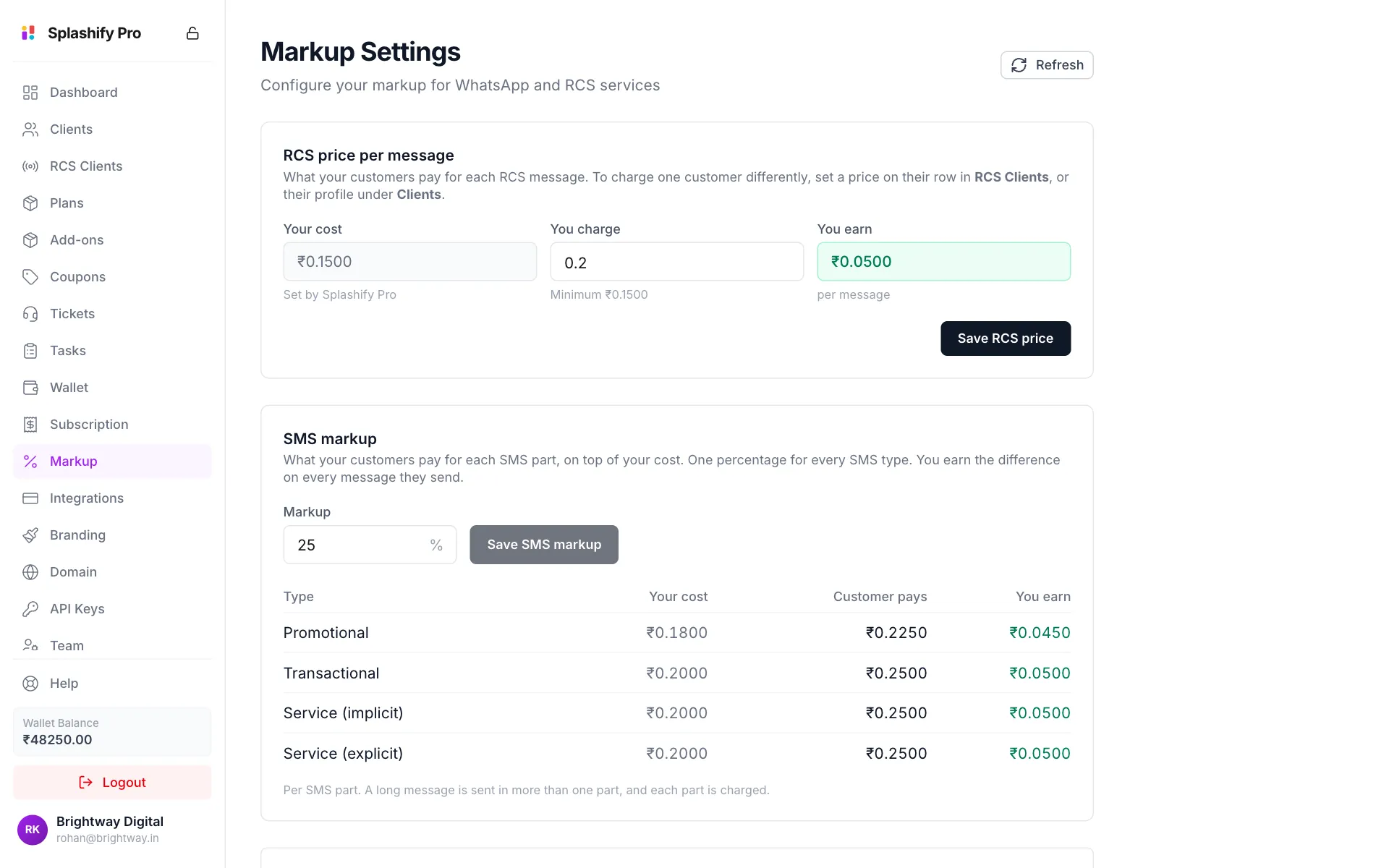
RCS price and SMS markup, each with its own save button Type your price
Type what clients pay per message in You charge. It cannot go below your highest cost, so no message type loses you money. You earn at least updates as you type, and turns red if you go below that cost.
Save
Click Save RCS price.
This price applies to all your clients who send RCS, both RCS panel clients and app clients. To charge one client differently, set a price on their row in RCS Clients, or on their page under Clients.
When your cost changes
Splashify Pro can change your RCS and SMS costs at any time. A new cost applies to messages sent after the change. Messages already charged keep their price.
When it changes:
- The new cost shows on this page straight away.
- A notice at the top of the panel shows each type that changed, with the old and new price. Click See costs to come here, or close it with the cross.
- You also get an email with the same prices.
What your clients pay does not change on its own. Check your prices here after a change. If you had no RCS cost before, your first cost becomes the base of your default price, so check what your clients pay straight away.
SMS markup
The SMS markup card sets one percentage for every SMS your app clients send. It has its own Save SMS markup button. See SMS Markup for the full guide.
WhatsApp Free Trial Markup
A client on the free trial has no plan yet, so the markup you set per plan cannot reach them. This card gives trial clients their own markup.
Tick Enabled
Scroll to WhatsApp Free Trial Markup and tick Enabled.
Set the percentages
Enter a percentage for Marketing, Utility and Authentication. Under each one you see your cost, what the client pays and what you keep. Service messages use the Utility percentage.
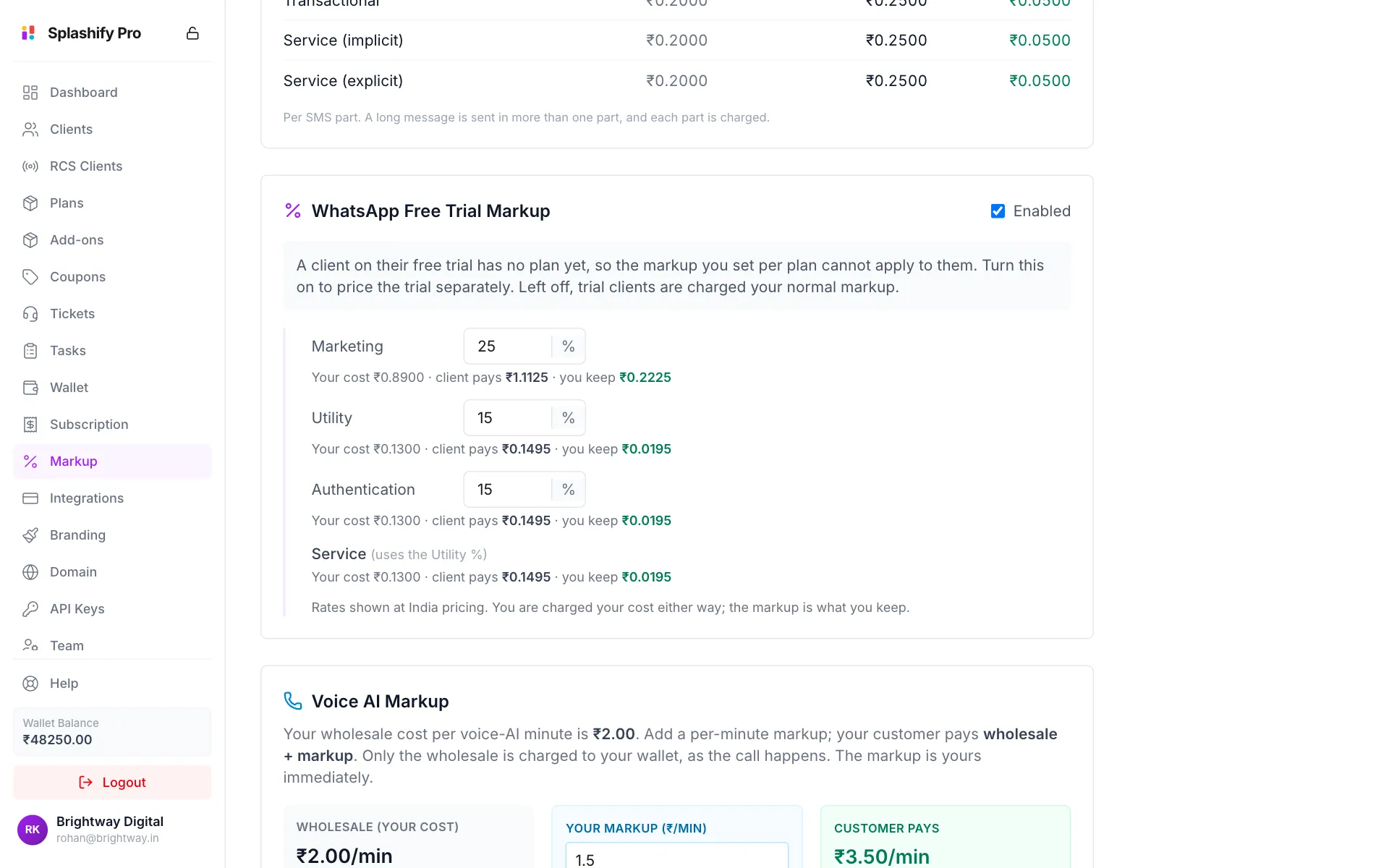
Trial markup, with what you keep on each message Save
Scroll to the bottom and click Save Settings.
Left off, trial clients are charged your normal markup.
Voice AI Markup
Your cost per Voice AI minute is shown under Wholesale (your cost). Type your extra in Your markup (₹/min). Customer pays shows the total per minute. If the markup is 0, clients pay your cost and you earn nothing on calls.
AI Feature Markups
Each AI feature has its own card: Chat AI Agent, AI Template Generator, Maya AI Flow Generator, CTWA AI Ad Copy, CTWA AI Lead Scoring, CTWA AI Ads Coach, CTWA AI Ad Image, Inbox AI Suggest Replies, Inbox AI Summary, Inbox AI Rewrite and AI Reading of Files and Voice Notes. For each one, type a rupee amount in Your markup (₹). The card shows the unit, such as per generation, per run or per million tokens.
AI Reading of Files and Voice Notes covers the documents (PDF, Word, Excel) and images your clients add to an AI agent's knowledge, and the voice notes their customers send to a chat AI agent. It is billed by the million tokens read.
The Chat AI Agent card also shows the Backup AI, read and Backup AI, written rates. If the main AI model is busy or down, a backup model answers, and the tokens it reads and writes are billed at these rates instead, per million tokens. Your chat markup is added to them too, so you earn it on every reply. Each one shows your cost and what your client pays.
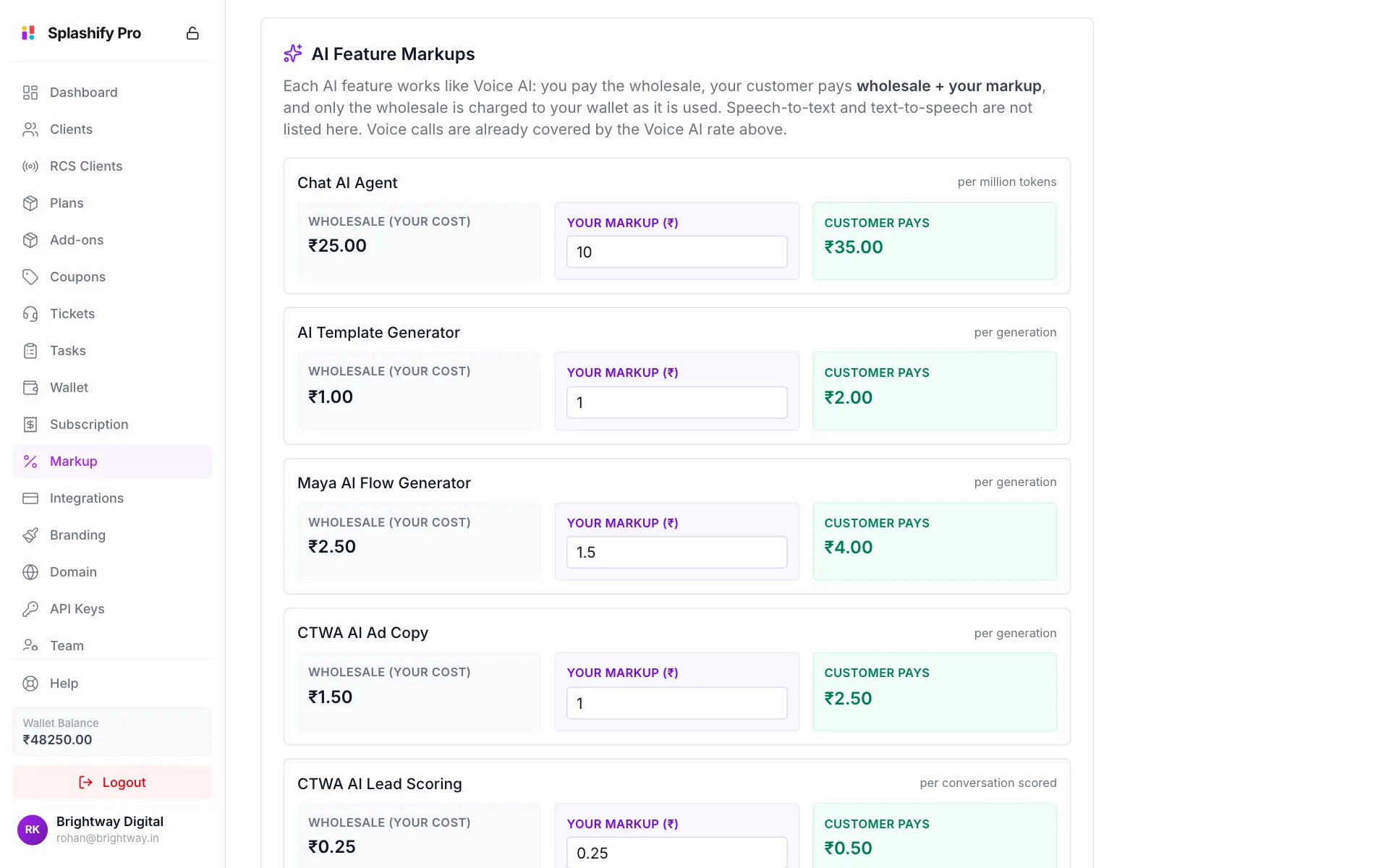
Email Tier Pricing and GST
Pick the default email tier
Under Email Tier Pricing, choose the Default tier for new clients. You can give one client a different tier on their page under Clients.
Set email prices per tier
For each tier (1k to 10k / month, 10k to 50k / month, 50k+ / month), enter Marketing per email and Transactional per email. The green line shows your profit per email. Prices cannot go below your cost of ₹0.02 for marketing and ₹0.01 for transactional email. Leave a tier empty to use the platform price.
Set your GST
Under Customer Billing Tax (GST), enter the Tax Name (for example
IGST) and Tax Pct (%). This tax is added to your clients' plans, add-ons and wallet recharges.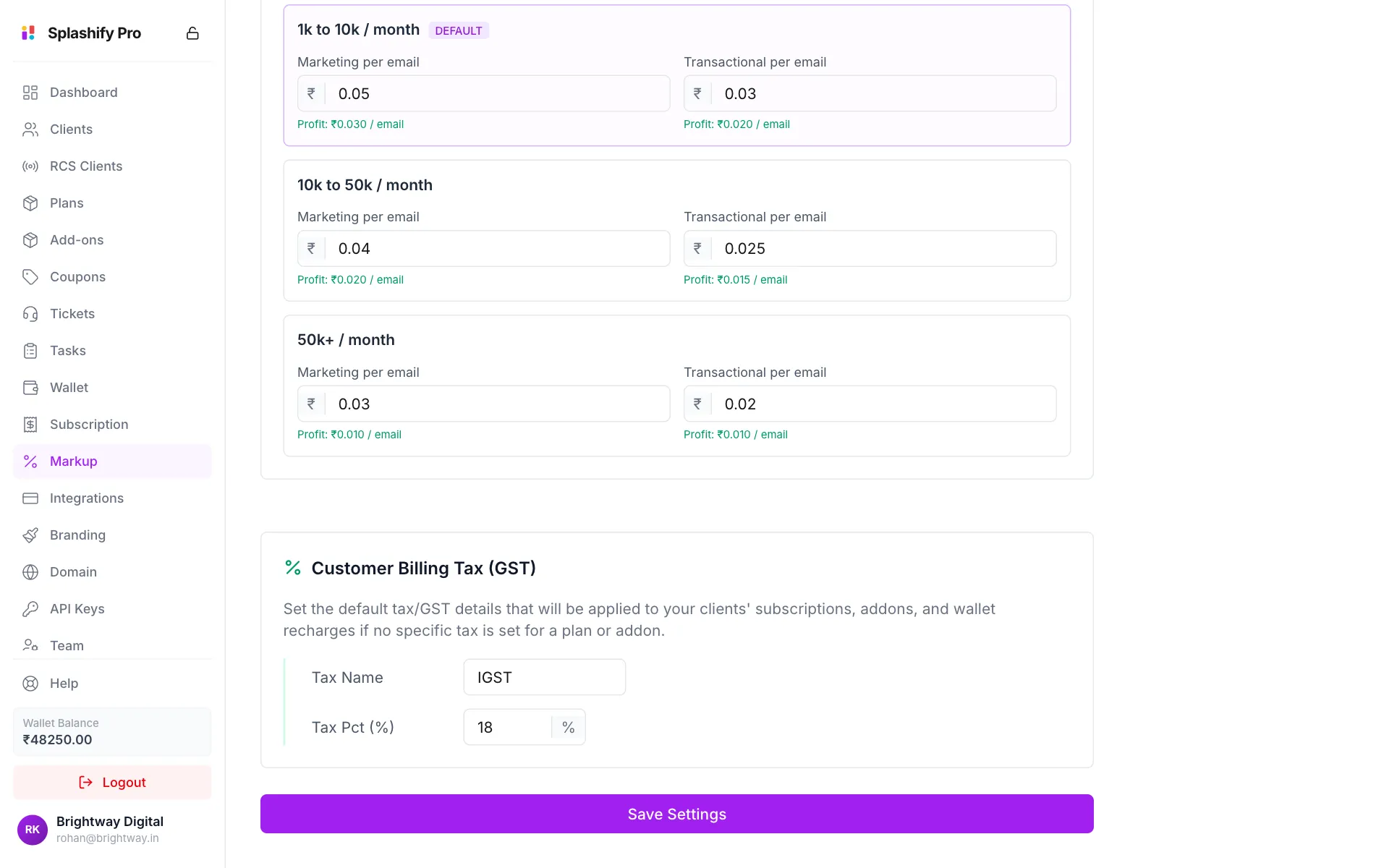
Email prices, your GST, and the Save Settings button Save
Click Save Settings. You see Markup settings saved.
Two cards have their own button
Save Settings saves everything on the page except the RCS price and the SMS markup. Those two save with Save RCS price and Save SMS markup in their own cards.
When a new price starts
A new price applies to messages sent after you save. Messages already charged keep their old price.
The SMS, WhatsApp free trial, Voice AI, AI feature and email cards show only if your account sells the WhatsApp app. See What You Sell.