
Buy or change a plan
Your plan decides which features you get and how much each WhatsApp message costs. You can buy a plan, move to a bigger one, or renew early from the app, and pay online.
The prices, GST and ways to pay on this page are for accounts in India. For an account outside India, see Using Splashify Pro outside India.
See your current plan
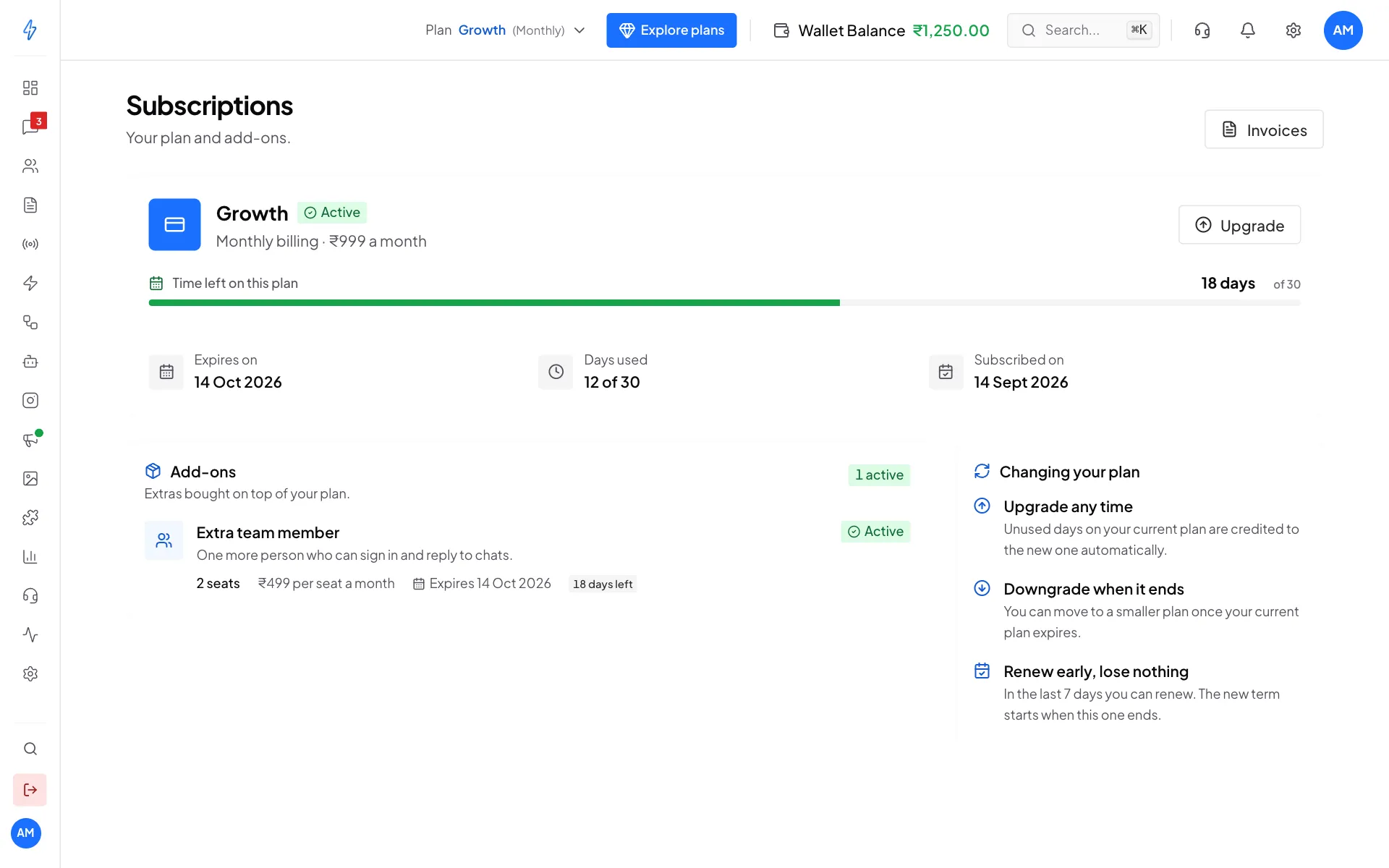
Open Settings (the gear icon in the left sidebar or the top bar), then click Manage Subscriptions. You can also click your plan name next to Plan in the top bar for a quick summary.
The Subscriptions page shows your plan name, how you are billed, Time left on this plan, Expires on, Days used and Subscribed on. Extras you bought, like more team seats, are listed under Add-ons.
Buy or upgrade a plan
Open the plans
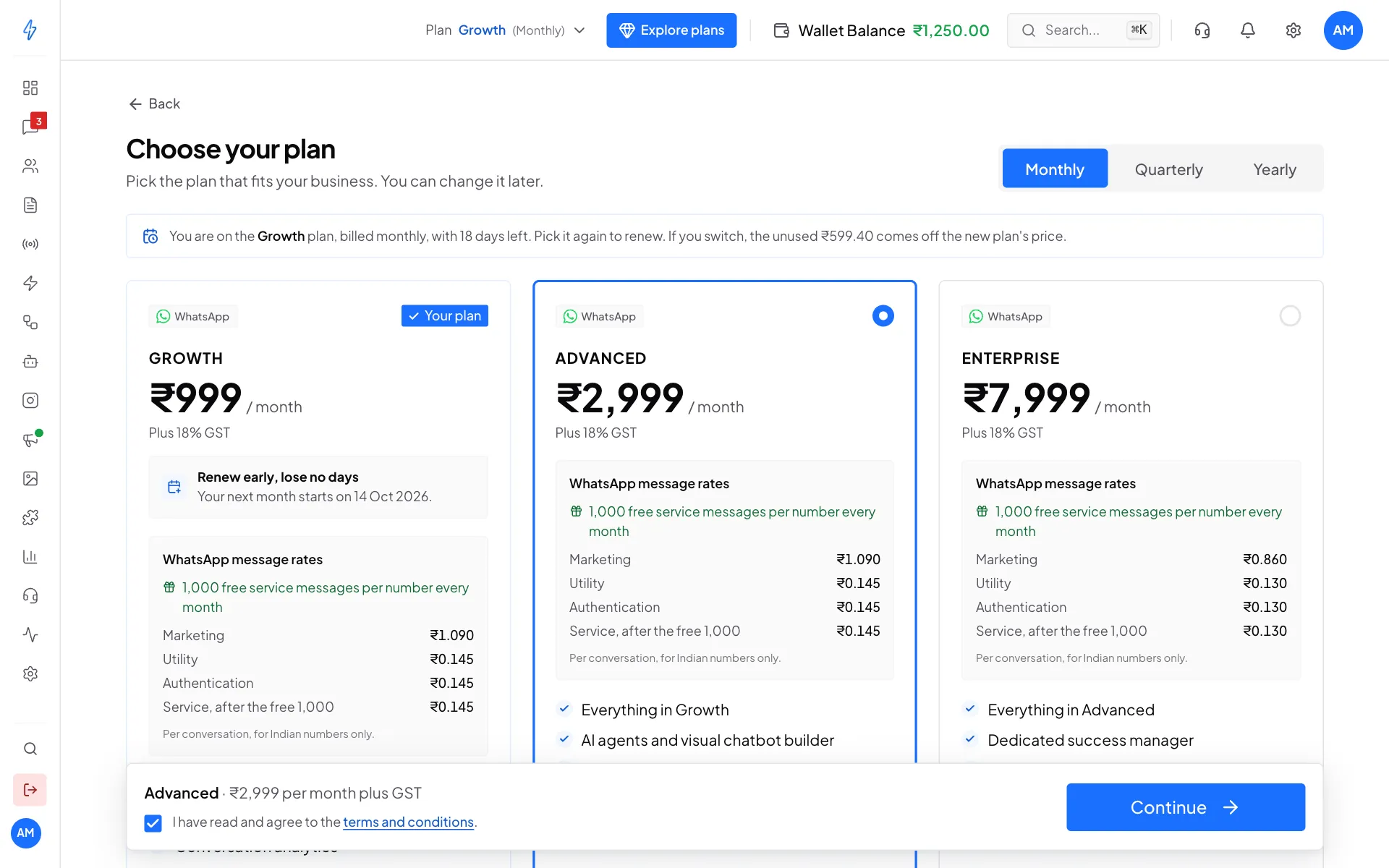
Click Explore plans in the top bar, or Upgrade on the Subscriptions page. The Choose your plan page opens.
Pick how often to pay
At the top right, choose Monthly, Quarterly or Yearly. Longer cycles work out cheaper per month. While a plan is active you cannot move to a shorter cycle.
Pick a plan
Each card shows the price, Plus 18% GST, the WhatsApp message rates for that plan and what is included. Click the plan you want. Your current plan has a Your plan badge.
Agree to the terms and continue
Tick I have read and agree to the terms and conditions in the bar at the bottom, then click Continue.
Pick a plan, tick the terms, click Continue Add extras and a coupon (optional)
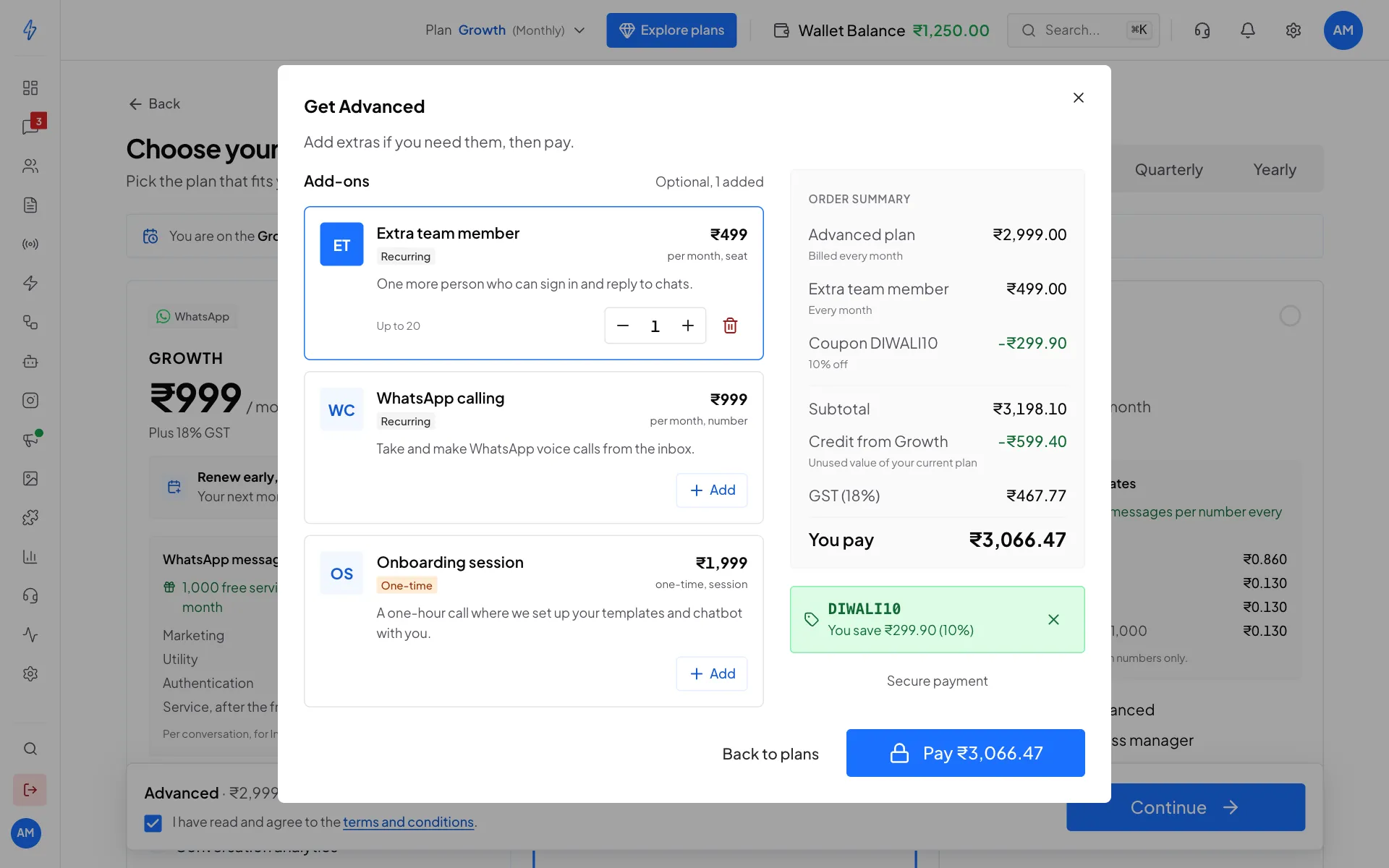
A box called Get and the plan name opens. On the left, click Add next to any extra you want, like an Extra team member, and use + and - to change how many. If you have a coupon, type it under Have a coupon? and click Apply.
Some discounts are added for you. When an offer covers the plan you picked, you see Discount applied with the code and how much you save, without typing anything. Click the X next to it to remove it, or type a different code under Have a different coupon?. If your account has its own discount on this plan, it shows as Your discount and comes off every time you pay for that plan, renewals too. Only one discount is used on an order. A code you type replaces the one added for you, and your own discount is kept whenever it saves you more. If a discount ends while the box is open, you are not charged when you click Pay. The box opens again with a note and the new total, so you can check it first.
The Order summary on the right shows the plan, extras, coupon, Credit from your current plan, GST (18%) and You pay. The discount and the credit come off the plan price only. Extras are always charged in full.
An Extra team member added here lasts as long as the plan, so its price covers the whole plan term. On a yearly plan, for example, the card says per year and you pay 12 months of the seat price.
Check the order summary, then click Pay Pay
Click Pay (the button shows the total). A secure payment window opens where you pay by UPI, card or net banking. When the payment goes through, you are taken back to the Subscriptions page with your new plan.
Add your billing address first
We need your billing address to make your GST invoice. If it is missing, the app asks for it before the payment window opens. See Wallet and billing details.
Switching plans: what you pay
- Upgrade any time. The unused days of your current plan come off the new price as a credit. The line Credit from your old plan in the order summary shows how much. The credit is worked out from what you paid for your current plan, so if you bought it with a discount, the credit is smaller. The new plan starts today.
- Downgrade when it ends. You can move to a smaller plan once your current plan expires. A smaller plan that costs less than your unused credit shows Not available until then.
Renew your plan
You can renew the plan you are on before it ends, without losing any days.
Wait for the last 7 days
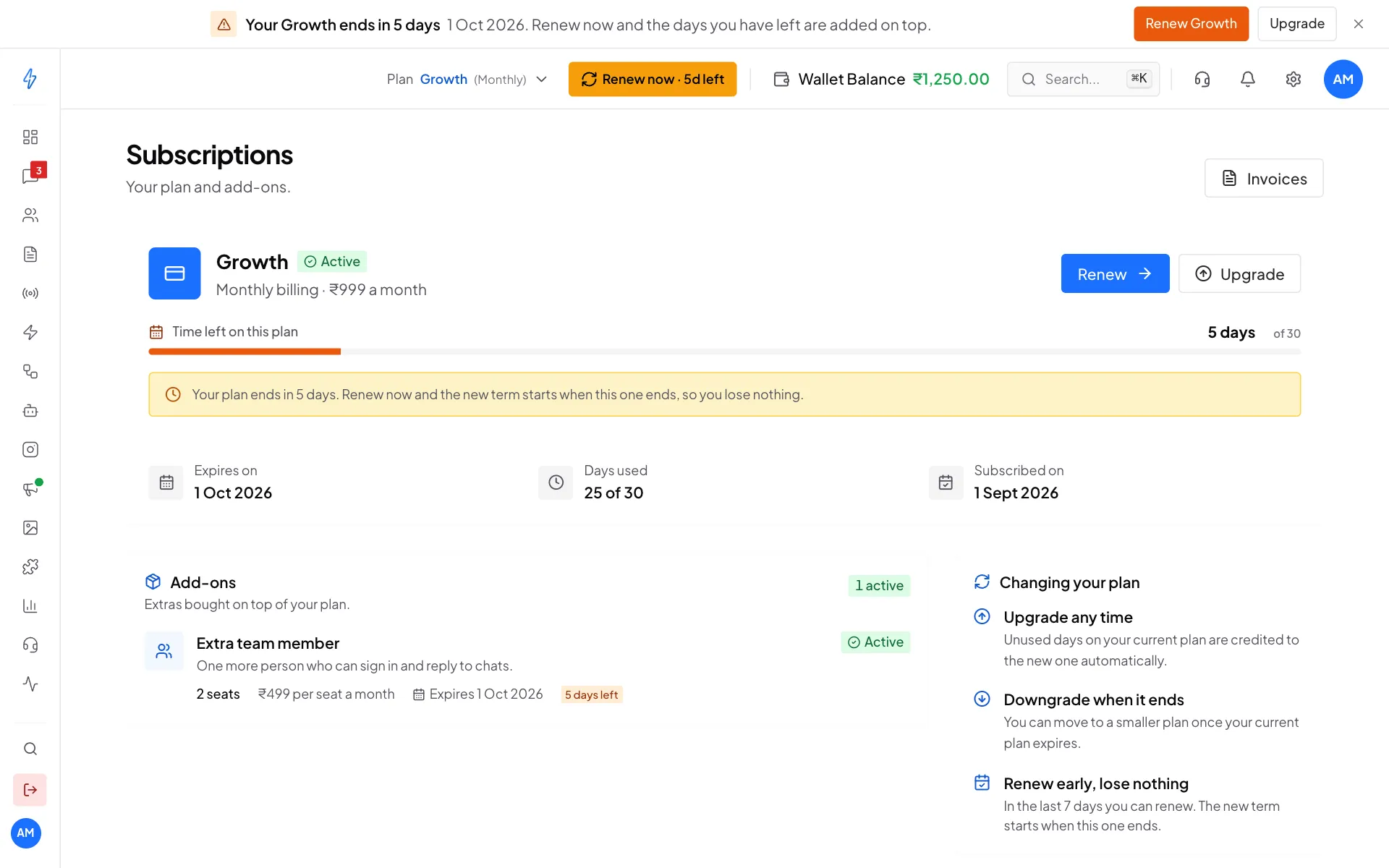
From 7 days before your plan expires, the Subscriptions page shows Renew next to Upgrade, with a yellow note. A reminder also shows at the very top of the app with Renew and Upgrade buttons.
When autopay renews your plan, there is nothing to renew: you see no Renew button and no reminders, only a note with the date autopay takes the next bill. See Renew by itself with autopay.
In the last 7 days, Renew appears Click Renew
Renew opens the plans page with your current plan and billing cycle already picked. Tick the terms, click Renew and pay.
- A renewal has no credit for unused days, because you keep those days. You pay the plan price, less any discount shown at checkout.
- The new term is added to your current expiry date, so renewing early costs you nothing. For example, renewing a monthly plan with 3 days left sets the new expiry to those 3 days plus one month.
- If your plan has already expired, the page shows the date it expired and a Renew button. The new term starts from the day you renew.
- Closing the reminder at the top of the app hides it only for this session.
Pay your renewal in WhatsApp
For accounts in India.
If your account's mobile number is an Indian number, the renewal bill comes to you on WhatsApp 7 days, 3 days and 1 day before your plan ends. The bill shows your plan, the GST and the total.
- Open the message from Splashify Pro on WhatsApp.
- Tap the button to review the bill, and pay inside WhatsApp, for example with UPI.
- Your plan renews for one more term, and you get a confirmation on WhatsApp. Your tax invoice is on the Invoices page.
If a payment does not go through, you get a message on WhatsApp with the same bill, so you can try again. You can always renew in the app instead.
You do not get the bill on WhatsApp when autopay renews your plan, or after you cancel your plan.
Renew by itself with autopay
For accounts in India.
With autopay, your plan renews by itself at the end of each term. You approve it once with your card or UPI, and your bank pays each bill.
Pick your plan
Open the plans page, pick your plan and how often to pay, and tick the terms, as in Buy or upgrade a plan.
Click Turn on autopay
Below the plan cards, the Renew by itself with autopay box shows what you pay and how often, tax included, and when the first bill is taken. Click Turn on autopay.
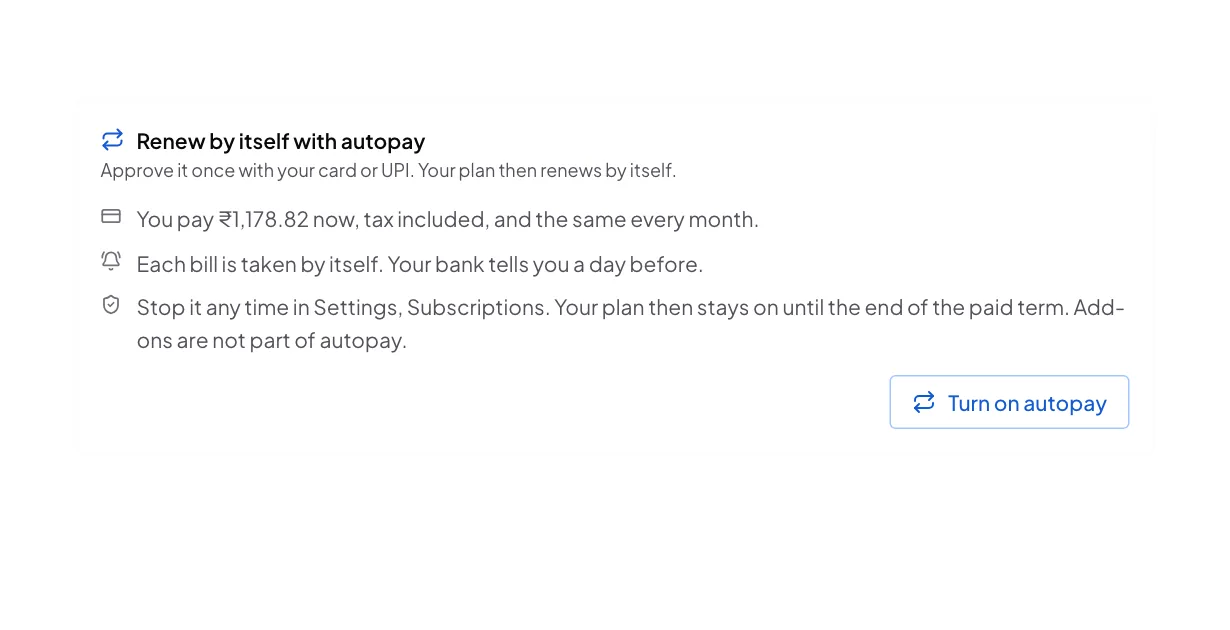
Turn on autopay when you choose your plan Approve it with your bank
A secure payment window opens. Approve autopay once with your card or UPI. You see Autopay is on, and the Subscriptions page opens.
- When you pay: if you have no plan running, the first bill is paid now. If your plan is still running, the first bill is taken one day before your current term ends.
- The bank's rule: a bill up to ₹15,000 is paid by itself. For a bigger bill, your bank asks you to approve each one, and sends you the request. Your bank also tells you a day before each bill.
- Bills above ₹1,00,000: UPI cannot pay a bill this big. Approve autopay with your card or bank account instead.
- While autopay is on, the Subscriptions page says Autopay renews this plan on and the date, with nothing to do. You get no Renew button and no renewal reminders. Upgrade is always there.
- If the bank cannot pay, Renew and the reminders come back, so you can keep your plan.
- Add-ons, like extra team members, are not part of autopay. Add them when you need them.
- Autopay is not offered when your account has its own discount on the plan, or when you change to another plan before your current one ends. Pay the usual way then.
See or stop autopay
Your autopay shows on the Subscriptions page, in the Autopay box: the plan, the Amount for each term, the Next bill date, what it is Paid with, and its state.
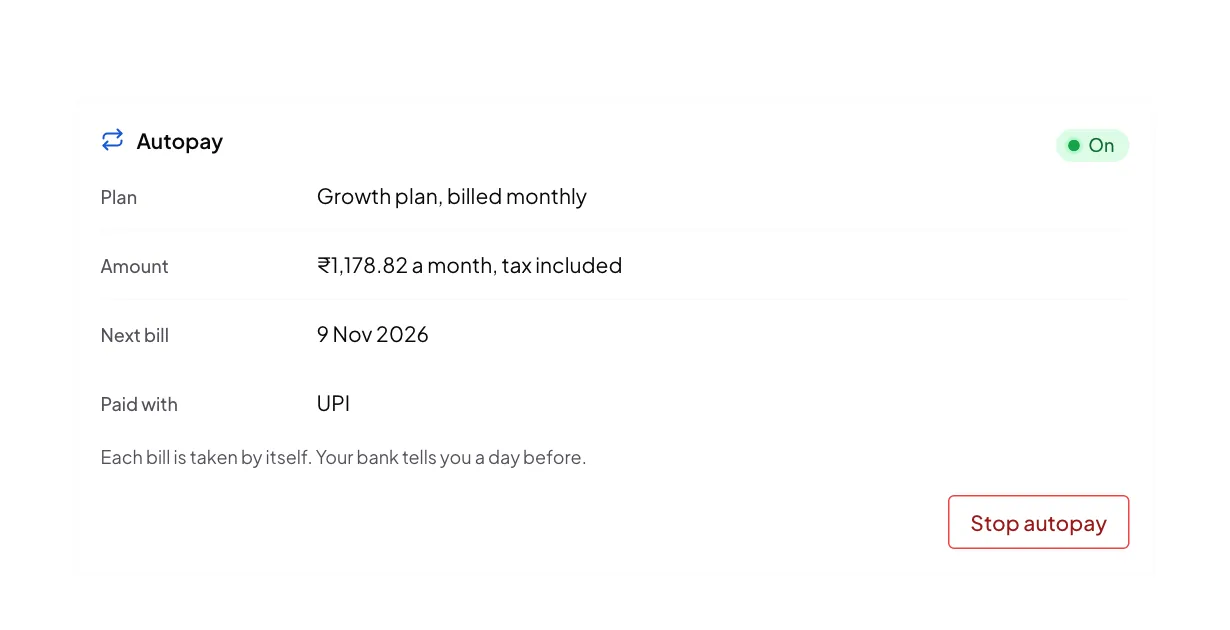
To stop it, click Stop autopay, then Stop autopay again to confirm. Your plan stays on until the end of the term you paid for. After that it does not renew by itself, and you renew it on the Plans page. To start again, click Turn on again. When you cancel your plan, autopay is stopped too.
What each plan card shows
Plans and prices can change. The plans page always shows the current ones.
Sales pipeline on every plan
The Sales pipeline is included in every plan. How many pipelines you can have depends on your plan. Check the feature list on each plan card to see how many it includes.
Add-ons
Add-ons are extras on top of your plan, such as more team member seats. You add them in the checkout box when you buy or renew a plan. Your active add-ons are listed on the Subscriptions page, with how many days are left.
Extra team seats end on the same day as your plan:
- During a plan, add seats at any time from Settings, Agents, Add seats. You pay only for the days your plan has left. See Add seats.
- When you renew, add your seats to the renewal in the checkout box, so your team keeps them for the new term.
Invoices
Every payment makes a GST invoice. Click Invoices at the top right of the Subscriptions page. See Invoices.
Cancel your plan
You can cancel your plan yourself. It stays on until the end of the term you paid for, then stops. There is no renewal and no new bill.
Only the account owner can cancel the plan. Everyone on your team sees the date it ends.
Open Subscriptions
Open Settings, then click Manage Subscriptions.
Click Cancel plan
Click Cancel plan at the bottom of your plan card. A box shows the date your plan stops.
Confirm
Click Cancel plan to confirm. Click Keep my plan to close the box and change nothing.
What happens when you cancel:
- Your plan and all its features stay on until the date shown. Then the plan stops.
- If autopay is on, it is stopped too, so nothing is charged again.
- You get no more renewal reminders for this plan: no reminder emails, no renewal bill on WhatsApp, no reminder calls and no reminder at the top of the app.
- When the plan ends, you get one message that it has ended, and no more messages about it after that.
- The plan card shows Ends on with the date.
- Add-ons, like extra team seats, never renew by themselves. Each one ends on its own date.
- Your data and settings stay safe. To come back later, pick a plan on the plans page.
Changed your mind?
Before your plan ends, click Undo next to Ends on on the Subscriptions page. Your plan is no longer cancelled: your renewal reminders come back, and you renew it as usual.
Undo does not turn autopay back on. If autopay was on before you cancelled, turn it on again on the plans page, as in Renew by itself with autopay.
Buying or renewing a plan also undoes the cancellation by itself.