
Instagram Chatbots
Workflow bots can reply on Instagram too. They answer direct messages, story replies and comments on your posts, and can move an interested customer over to WhatsApp with a template message.
What you need
Instagram bots need a plan with Instagram Automation, and your Instagram business account connected under Instagram in the left sidebar. Trial accounts get full access.
Create an Instagram bot
Start a new bot
In the left sidebar, click AI Agents & Bots, then Create agent. Click Workflow bot, then Next.
Pick Instagram as the channel
Type a Bot name, then under Channel click Instagram. The channel cannot be changed later. Click Create bot.
If the Instagram card says your plan needs an upgrade, or asks you to connect Instagram first, clicking it takes you to the right page.
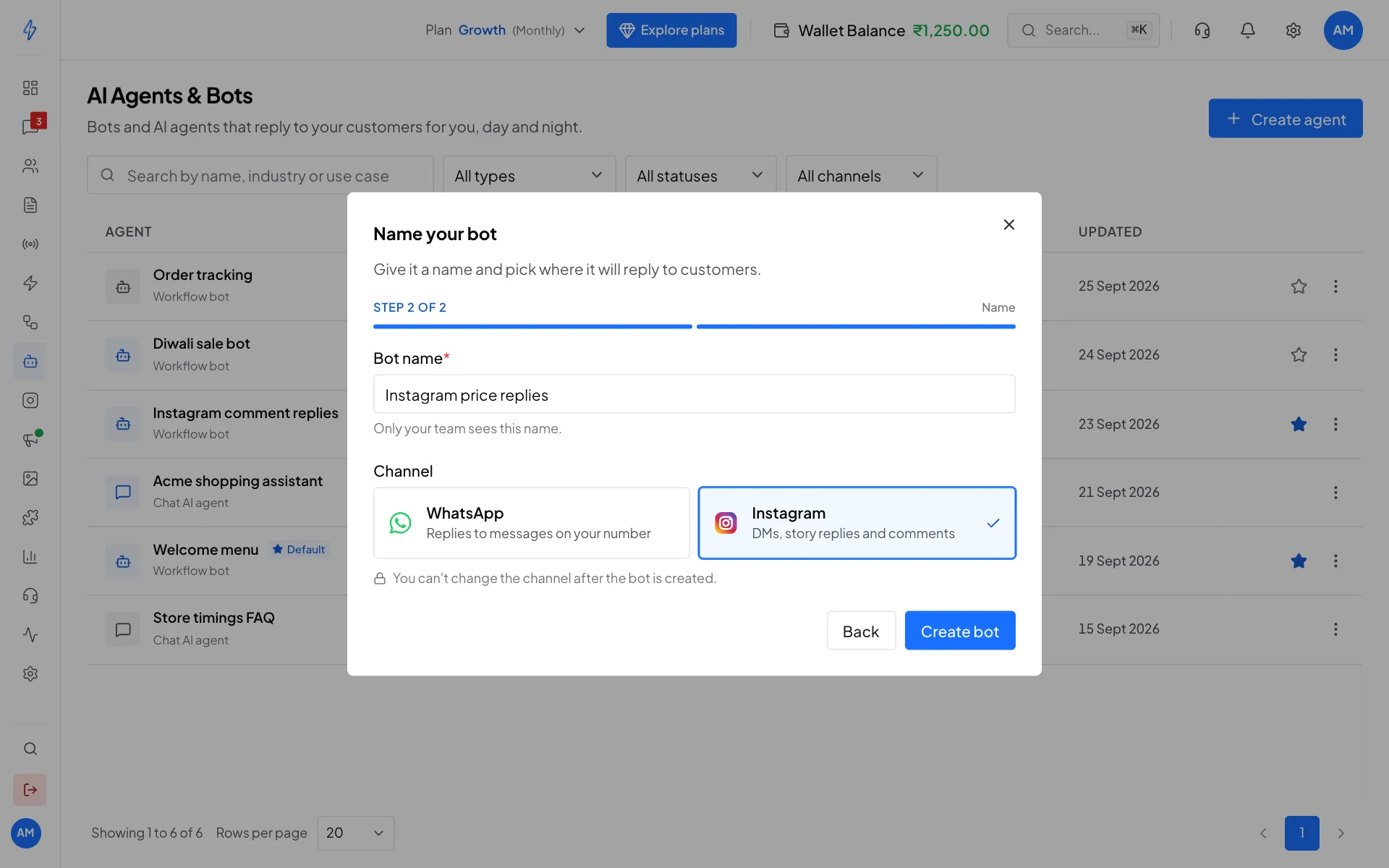
Pick Instagram when you create the bot Choose the trigger
The builder opens with the Instagram colour and only the steps that work on Instagram. Add the On Message trigger and pick what starts the flow:
- Any direct message: every new DM (story replies are not included)
- A DM with a keyword: only DMs that match your keywords
- A reply to your story: when someone replies to one of your stories
- A comment on your post: sends a private reply to people who comment on a post you pick
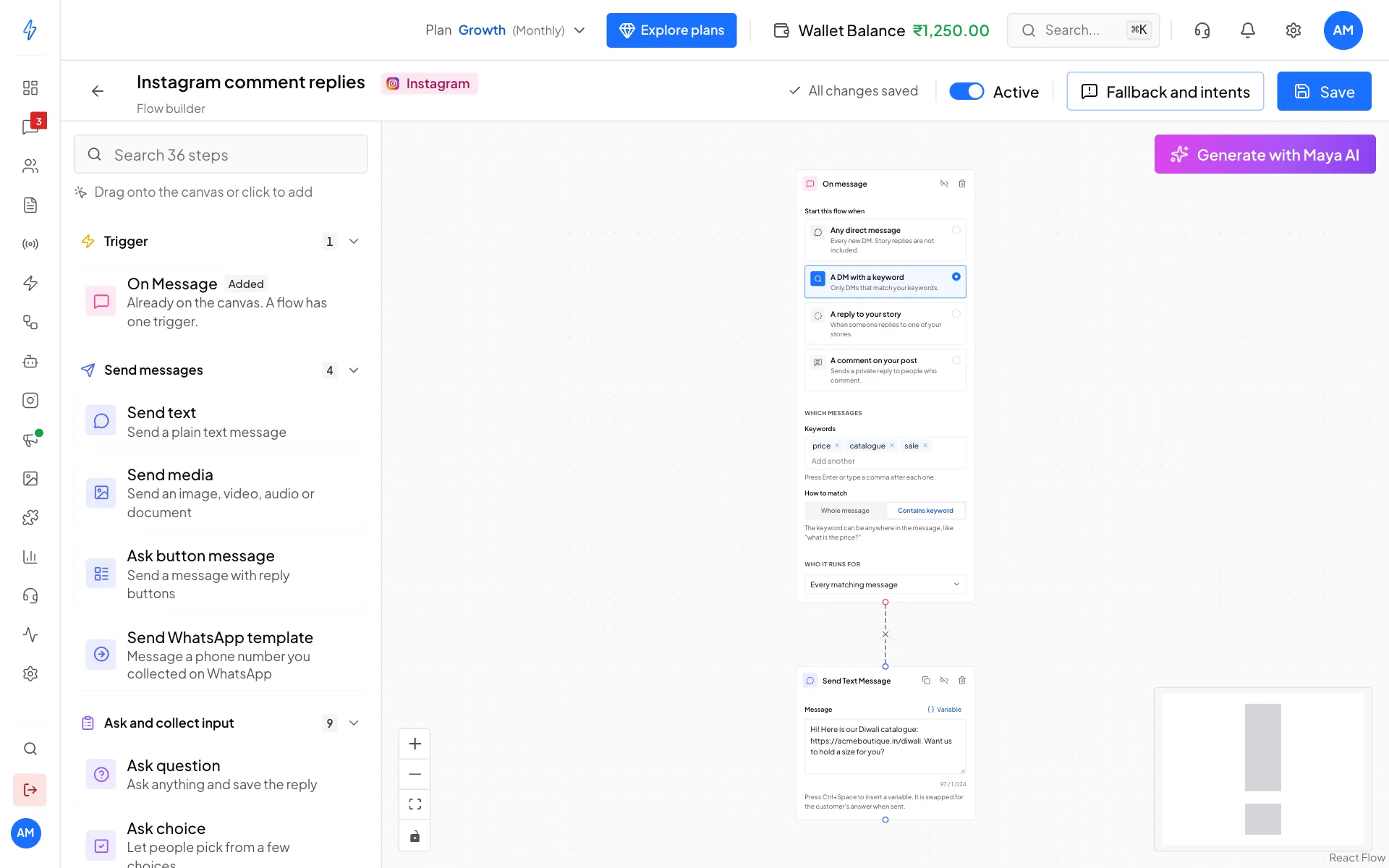
An Instagram bot that answers DMs about prices Add steps, save and turn it on
Add and connect steps just like a WhatsApp bot (see Build a chatbot). Click Save, then switch Active on.
Make it the default Instagram bot (optional)
In AI Agents & Bots, click the star on its row, or ⋮ then Make default Instagram bot. This is separate from your default WhatsApp bot.
Test it by sending a DM with your keyword from another Instagram account. Replies show in Messages on the Instagram tab.
WhatsApp bots and Instagram bots side by side
Each bot is either WhatsApp or Instagram, picked when you create it. The builder only shows the steps that work on that channel.
More Instagram triggers
The On Message step offers the four starts above. The one-click automation recipes can also set up these triggers for you:
- Story mention: someone mentions you in their story (only from public accounts or people who follow you)
- Ice breaker tapped and Menu item tapped: someone taps one of your ice breakers or menu items
- Quick reply tapped and Button tapped: someone taps a chip or button your bot sent
- Any tap: any of the taps above
- ig.me link: someone arrives through one of your ig.me links
Taps are matched on the button's hidden value, not its label, so renaming a button never breaks the flow behind it.
Comment triggers: start with a message
When the trigger is A comment on your post, the first step after the trigger must send something (Send text, Send media, a button message or quick replies). Instagram only lets a bot answer a comment with one private reply, straight away. If the first step is a Condition or a Delay, the customer never gets a DM. Saving tells you if this is the case.
Comments and comment-to-DM rules
If a comment-to-DM rule on the same post and keyword matches first, the rule replies and the bot is skipped. So:
- For a one-off DM reply, use a comment-to-DM rule
- For a longer conversation, use a bot with a comment trigger
- Do not set both on the same post and keyword
Send WhatsApp template: move a lead to WhatsApp
Add a Send WhatsApp template step to message the customer on WhatsApp, for example after an Ask phone step collected their number.
- Phone number variable: pick the saved answer that holds the phone number.
- WhatsApp template: pick an approved template.
- Fill in the blanks: choose what goes in each blank of the template.
- After the template is sent: End the Instagram flow, or Continue with a WhatsApp bot and pick the WhatsApp bot that carries on when the customer replies on WhatsApp. Answers collected on Instagram carry over.
- Consent: tick The customer agreed to get WhatsApp messages. Use a utility or authentication template unless the customer also agreed to marketing messages.
The customer is added to your contacts with the tag instagram-handoff, and the template is charged from your wallet like any WhatsApp template. If the phone number is missing or WhatsApp is not connected, nothing is sent and the flow moves on.
Instagram's messaging window
Instagram limits when you can message people:
- Within 24 hours of their last message: send freely.
- Between 24 hours and 7 days: messages are sent as a human agent reply, as Instagram requires.
- After 7 days: Instagram refuses the message. The bot skips it and moves on, so non-message steps (tags, conditions, Send WhatsApp template) still run.
Two ways to reach a customer after that:
- Send WhatsApp template, which moves the conversation to WhatsApp.
- Recurring notifications: the Opt-in request step asks permission to send daily, weekly or monthly updates. See the Ask permission to follow up recipe.
Passing the chat to a person
Meta requires every automated Instagram chat to have a way to reach a real person. Either:
- Your team answers in Messages in this app. Nothing to set up.
- Add a Hand off step to pass the chat to the Instagram inbox, where a teammate carries on. The Hand off to a human recipe sets this up from a keyword like human or agent. After the hand off, the bot stops, so it does not talk over your teammate.
Say it is automated
Where the law requires it (for example California and Germany), an automated chat must say so at the start, after a long gap, or when a person hands back to the bot. The Welcome new DMs recipe's greeting already does this. If you rewrite it, keep a line like "You're chatting with our automated assistant."
Where to find things
- Create a bot and pick Instagram: AI Agents & Bots, then Create agent, then Workflow bot
- One-off comment replies: Instagram in the left sidebar, comment-to-DM rules
- Default Instagram bot: the star on the bot's row in AI Agents & Bots
- Testing: Messages, Instagram tab. Bots reply to real DMs
- Instagram-only steps and every trigger: Instagram chatbot nodes
- One-click recipes: Automations
- Ice breakers and menu: Ice Breakers & Menu