
Lead capture widget
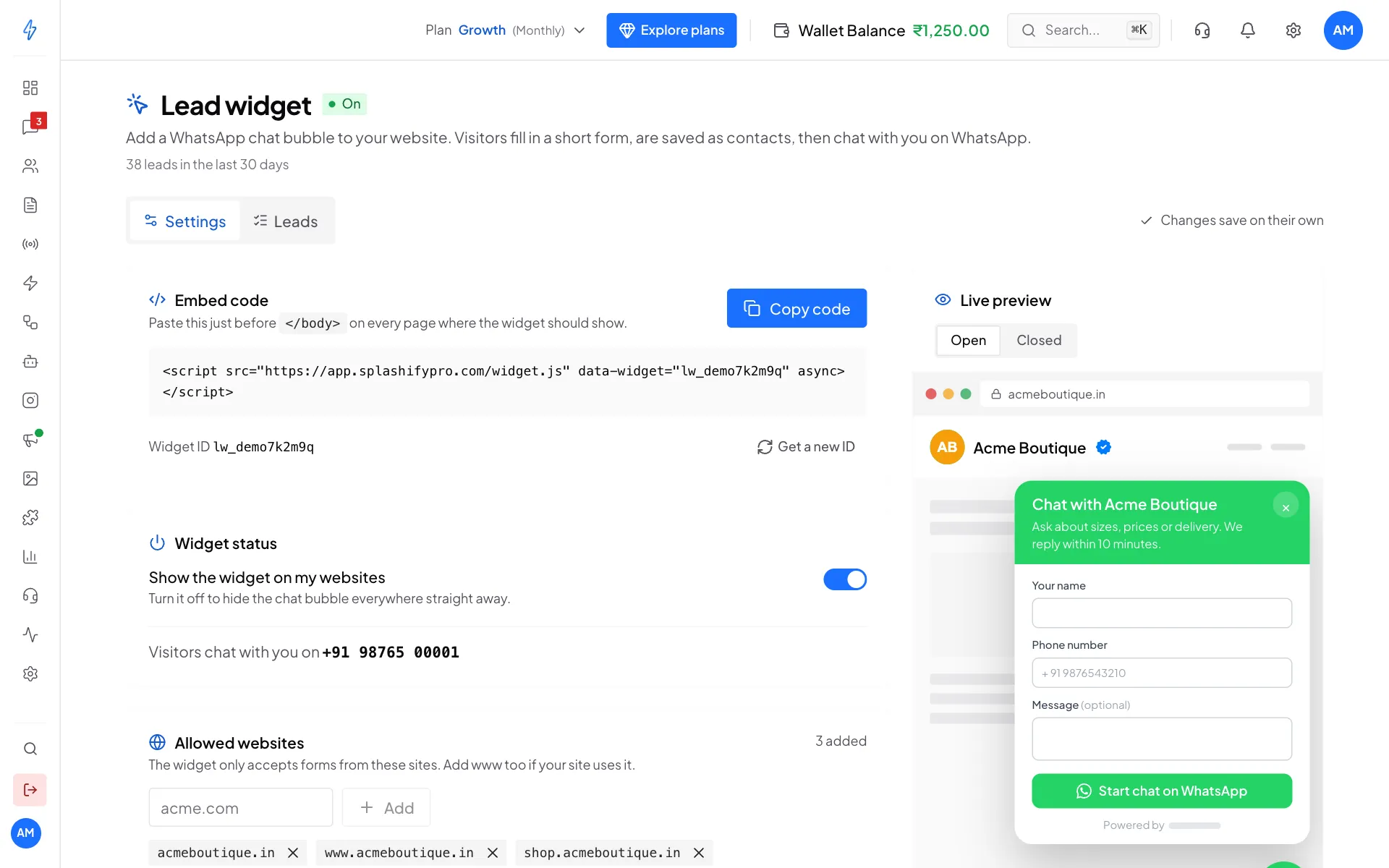
The lead widget is a WhatsApp chat bubble for your website. A visitor taps it, fills in a short form, and is saved in your Contacts. Then WhatsApp opens with their message ready to send to you.
What you get
- One line of code. Paste it on your website and the bubble shows at the bottom of every page.
- Your look and words. Colour, left or right corner, headline, button text and the WhatsApp message.
- Every visitor saved. Each form creates a contact tagged
lead-widget, with the page they came from. - Chats in your inbox. When the visitor sends their WhatsApp message, the chat lands in Messages, already linked to the contact.
- Spam protection. Only your websites can send forms, each visitor can send at most 10 forms an hour, and you can add an extra Cloudflare check.
- Meta ads tracking. If Meta is connected in Ads settings, every form is reported to Meta as a lead.
- Safe for your site. The widget runs in its own space, so it never changes how your website looks.
Before you start
- A plan that includes the lead widget. If yours does not, the page shows Your plan does not include the lead widget with an Upgrade plan button.
- A connected WhatsApp number. Visitors are sent to chat with this number.
Quick start
Open Lead Widget
Click Settings (the gear icon) in the top bar or near the bottom of the left sidebar. In the Settings box, under Analytics & Commerce, click Lead Widget.
Add your websites
Under Allowed websites, add each site where you will paste the code, like
acmeboutique.inandwww.acmeboutique.in.Make it yours
Change the colour, the corner and the words. The Live preview on the right updates as you type. Changes save on their own.
Copy the code
Click Copy code in Embed code.
Paste it on your site
Paste it just before
</body>on every page. The bubble shows within seconds.
New leads show on the Leads tab of the Lead widget page, and in Contacts with the tag lead-widget.
How it works
- A visitor on your website clicks the bubble. A small form opens (name, phone, and a message if you want one).
- They click Start chat on WhatsApp (or your own button text).
- The app checks the website is allowed, applies the spam limits, and saves the contact with the tag
lead-widget. - WhatsApp opens with their message typed in. When they send it, the chat lands in Messages.
The contact exists before the visitor even sends their first WhatsApp message. So you can add tags, run bots or assign the chat as soon as the form arrives.
Continue reading
- Set up and embed: step by step, with website builder tips
- Customize: colour, words, form fields and spam protection
- Captured leads: where leads go and how to use them
- Troubleshooting: common problems and fixes