
Analytics
The Analytics page shows how your WhatsApp messages are doing: how many you sent, how many reached the phone, how many were read, and how many failed. Use it to spot a bad day, or a template type that often fails.
Open your analytics
Open Analytics
In the left sidebar, click Analytics.
Pick a time period
Click Today, Last 7 days, Last 30 days or Last 3 months. Every number and chart on the page changes to that period. Click Refresh at the top right to load the newest numbers.
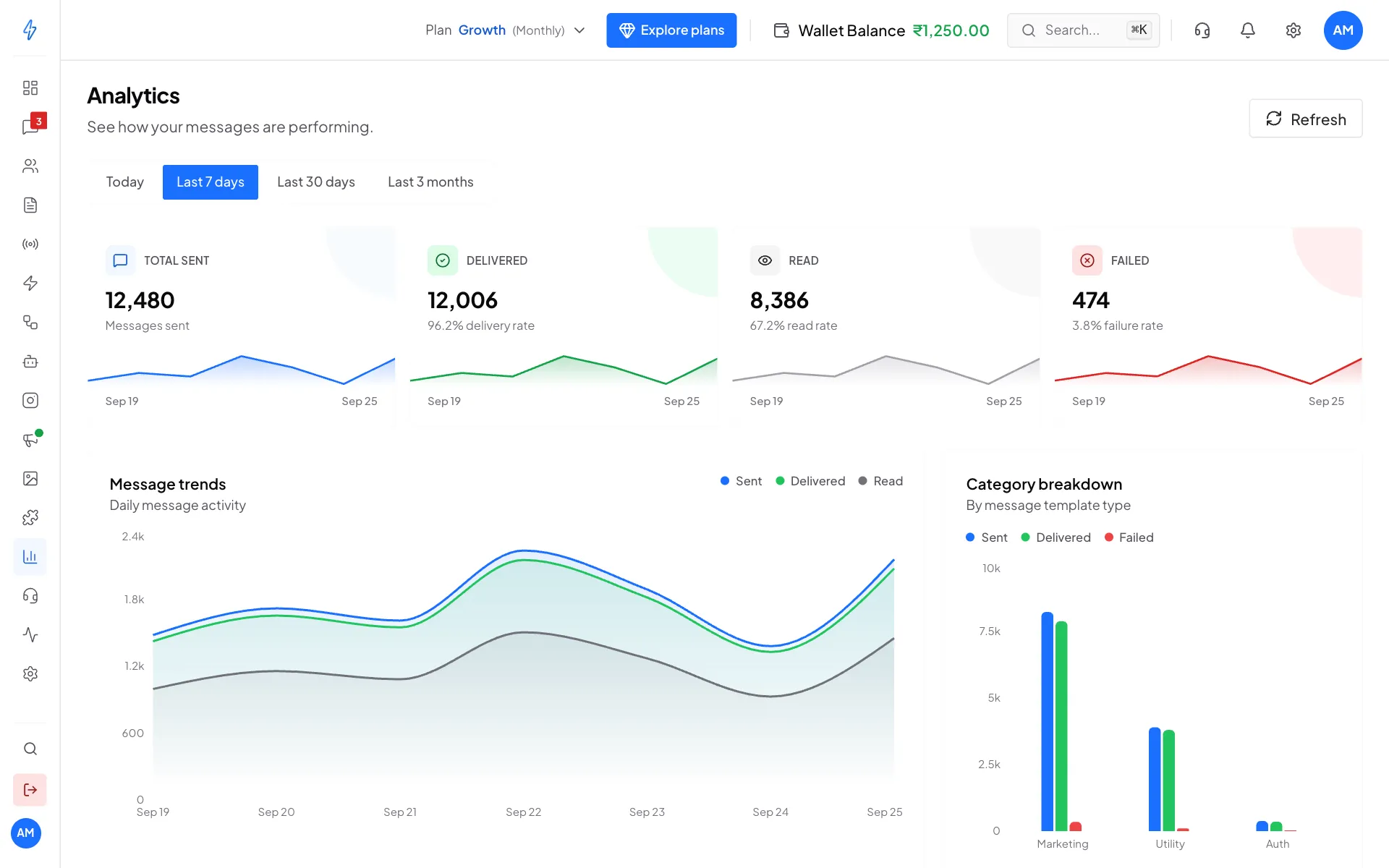
The four totals at the top, then the charts Read the four totals
- Total sent: messages you sent in the period
- Delivered: messages that reached the customer's phone, with the delivery rate
- Read: messages the customer opened, with the read rate
- Failed: messages WhatsApp could not deliver, with the failure rate
The small line under each total shows how it moved day by day.
The charts
Point at any chart to see the exact numbers for a day.
What the numbers tell you
- A low read rate on marketing messages usually means the offer or the first line is not catching attention. Try a shorter message or a better header.
- A high failure rate usually means wrong or old numbers in your contacts, numbers that are not on WhatsApp, or customers who have received too many marketing messages from businesses recently. Clean your lists and send marketing less often.
- A drop on one day often matches a broadcast. Compare with Broadcasts to find which one.
If you see No messages found, no messages were sent in that period. Pick a longer period.
Reply times and bot results
Under the period buttons, the row Inbox numbers opens a second page. For your WhatsApp chats, it shows how long customers waited for a first reply from your team, and how many chats your chatbot or AI agent finished without a person. See Inbox numbers.
Related
- Inbox numbers: first reply time, and chats handled without a person
- Team report: chats each team and person picked, passed on and resolved
- Track expenses: what you spent on messages, calls and AI
- Click-to-WhatsApp (CTWA) tracking: chats and results from your Facebook and Instagram ads
- Activity Logs in the left sidebar: who on your team did what, and when