
Support tickets
Stuck, found a bug, or have a billing question? Raise a support ticket from the app. Our team replies in the ticket, you answer there too, and the whole conversation stays in one place. We usually reply within 2 to 4 hours.
Raise a ticket
Open Support
Click Support (the headset icon) in the left sidebar. You see your tickets, with their status, priority and when they were last updated.
Click New ticket
Click New ticket at the top right. The Raise a support ticket box opens.
Pick what it is about
Click the kind of help you need: Bug report, Billing, Feature request, Account or General question. Then click Continue.
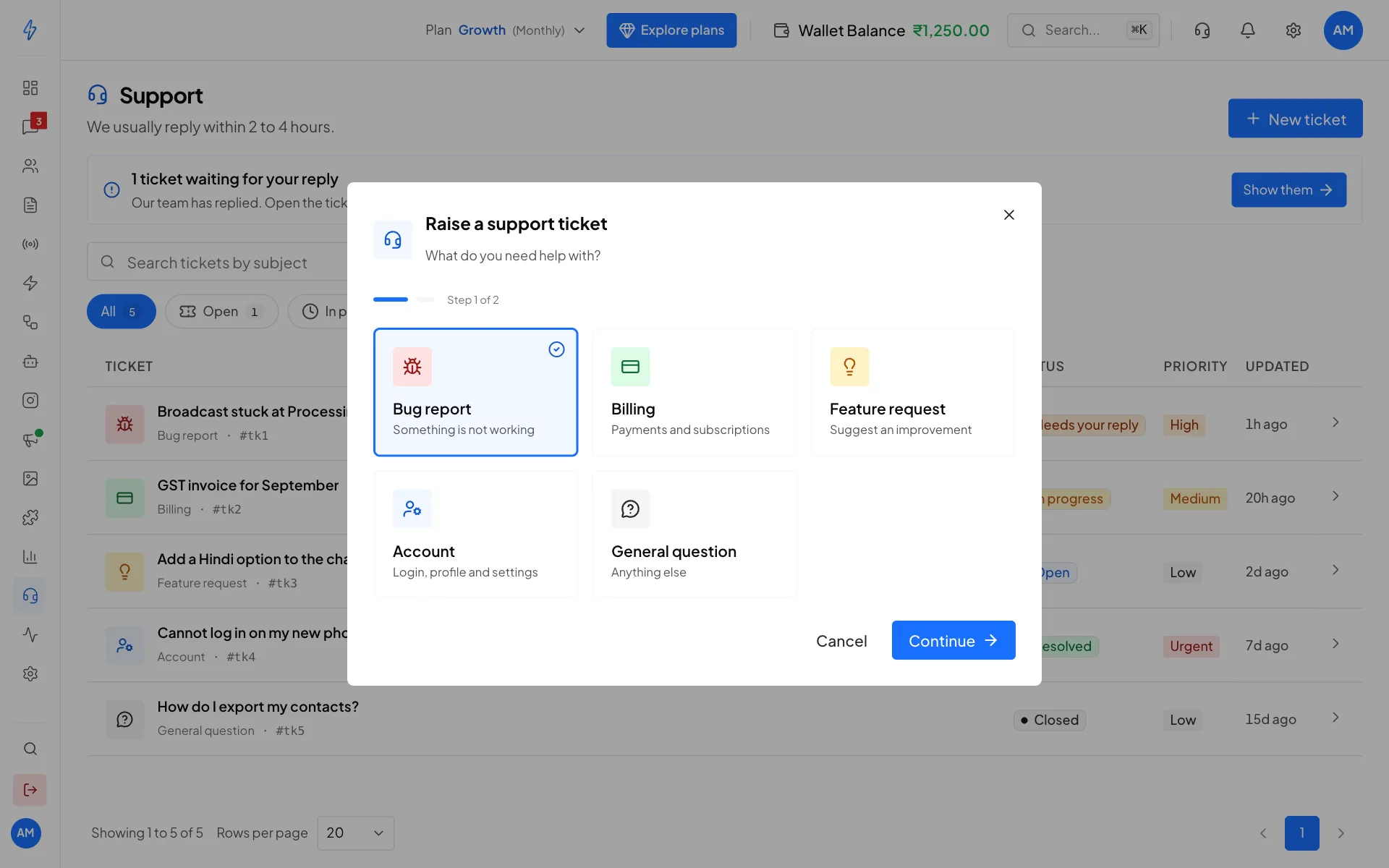
Step 1: what do you need help with? Describe the problem
Type a short Subject, pick the Priority (Low, Medium, High or Urgent), and write the Description. Say what happened and the steps that led to it. The more detail, the faster we can help.
A screenshot of the problem helps us most. Add it under Attachments (see Attach screenshots and files).
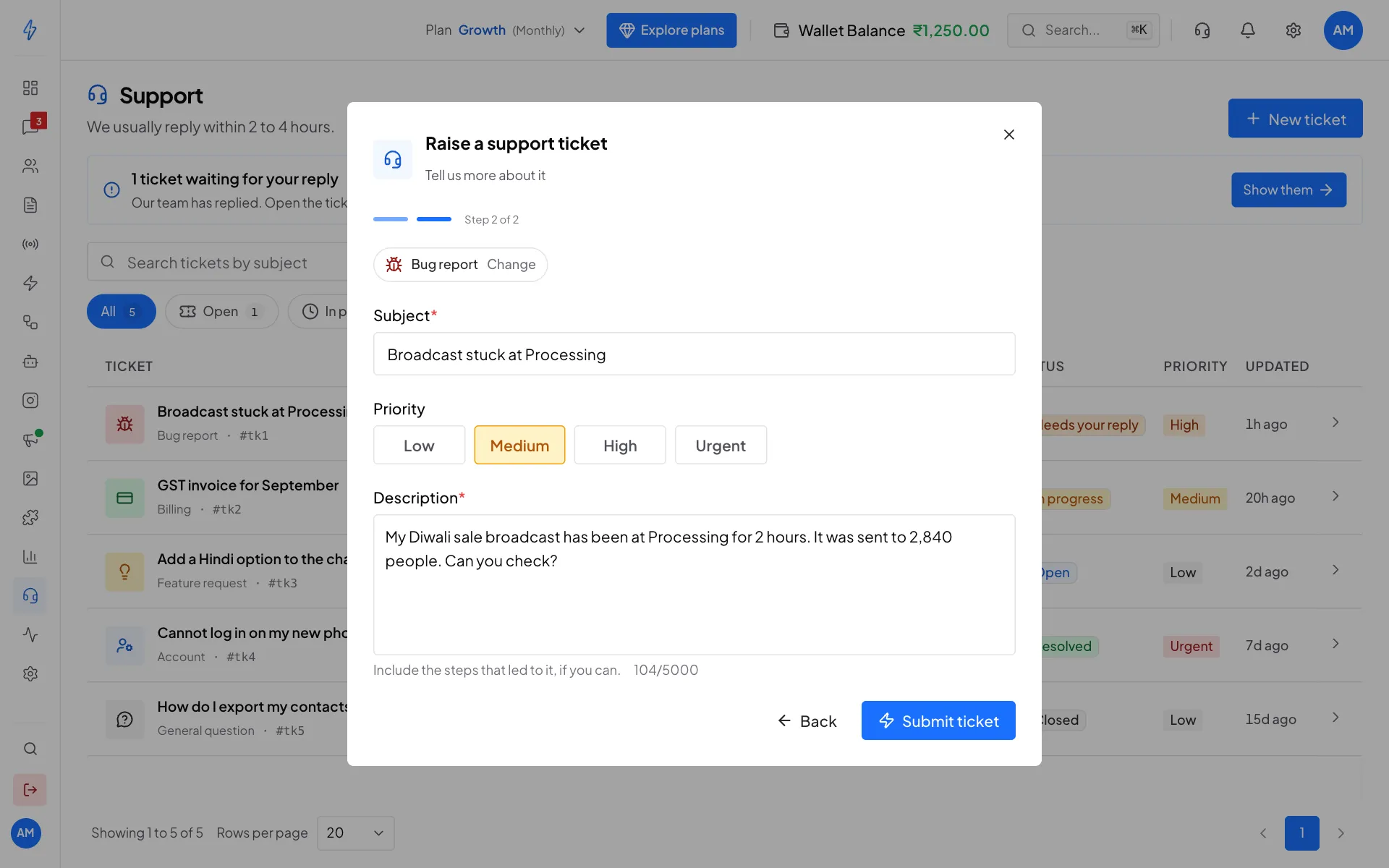
Step 2: tell us more about it Submit
Click Submit ticket. You will see Ticket submitted. We will get back to you soon. The ticket appears in your list as Open.
A first answer from our AI assistant
An AI assistant may give the first answer on your ticket. To do that it reads the ticket and the screenshots you attached. Its messages are marked AI assistant, so you always know it is not a person.
- If the answer solved your problem, click This solved it. The ticket closes.
- If it did not, click Talk to a person, or simply reply. Our team takes over and answers in the same ticket.
While an answer waits for you, a small bar at the top of every page asks Did the answer solve your ticket? You can choose there too, and in the email we send you.
The assistant only answers. It changes nothing in your account, and it never closes a ticket by itself. If we do not hear from you for a few days after an answer, the ticket closes, and you can open a new one any time.
Urgent tickets
Pick Urgent when your business is stopped and you need a person now. Low, Medium and High are always free.
Urgent support can be paid (for accounts in India). When it is, the form tells you so before you submit:
- the price, which is taken from your wallet when you submit the ticket
- the time by which a person from our team replies, and the time by which we solve your ticket, for a ticket submitted now
- when support is closed, that both times are counted from the hour it opens
The price and the two times are shown in the form, so always read them there.
- Pick Urgent under Priority. A notice shows the price and the two times.
- Click the button, which now shows the price (Pay the amount and submit). The money leaves your wallet and the ticket is created in one step.
If the price or the times change while the form is open (for example, support closes), the form shows the new ones and asks you to submit again. Nothing is taken until you do.
A team member can raise a paid Urgent ticket only when the account owner has given them Full access to Wallet (in Settings, under Agents). Anyone in the team can raise a High ticket.
If the form says We are checking the payment for this ticket, do not submit it again. We could not confirm the payment, our team has been told, and we will contact you. If you cannot wait, raise the ticket as High.
If your wallet balance is too low, the form shows your balance and an Add money button. It opens the Wallet page in a new tab, so what you typed and the files you attached stay where they are. Add money, come back to the form and click Check again. Or click Use High instead, which is free.
On the ticket you see what you paid, and when the reply and the fix are due. The time for the fix stops while we wait for your answer, and runs again when you reply. If you close the ticket yourself, we count it as solved.
If we miss either time, the full fee goes back to your wallet on its own. You do not have to ask. We add a note to the ticket and email you, and your ticket stays Urgent.
Follow your tickets
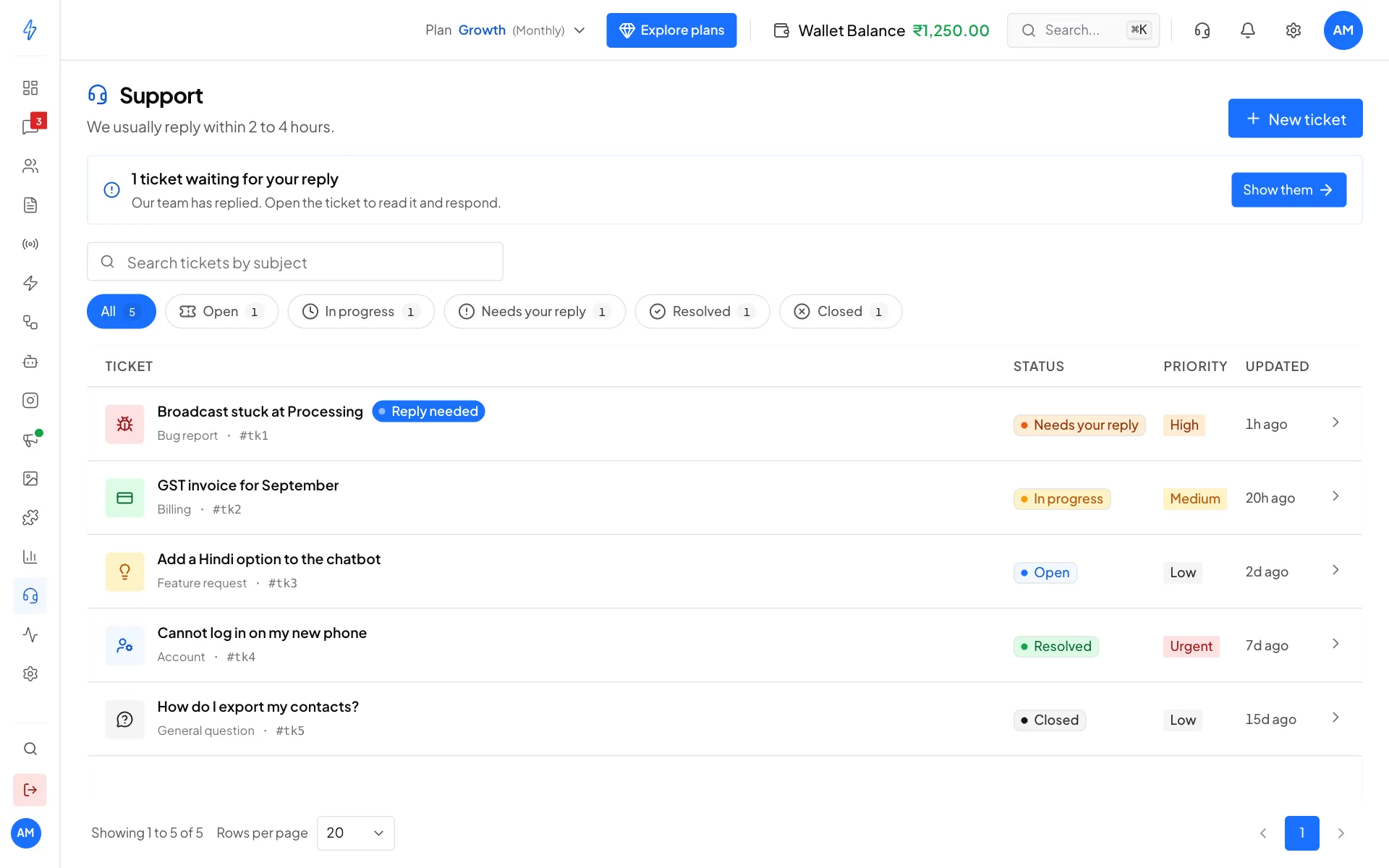
- A banner at the top tells you when a ticket is waiting for your reply. Click Show them to see only those.
- Click All, Open, In progress, Needs your reply, Resolved or Closed to filter the list.
- Type in Search tickets by subject to find one.
Reply to a ticket
Open the ticket
Click the ticket in the list. You see the whole conversation, with our replies on the left and yours on the right. The top shows when it was Opened, its Age, how many Replies and the Last activity.
Write your reply
Type in Write your reply at the bottom, then click Send reply (or press Ctrl and Enter together).
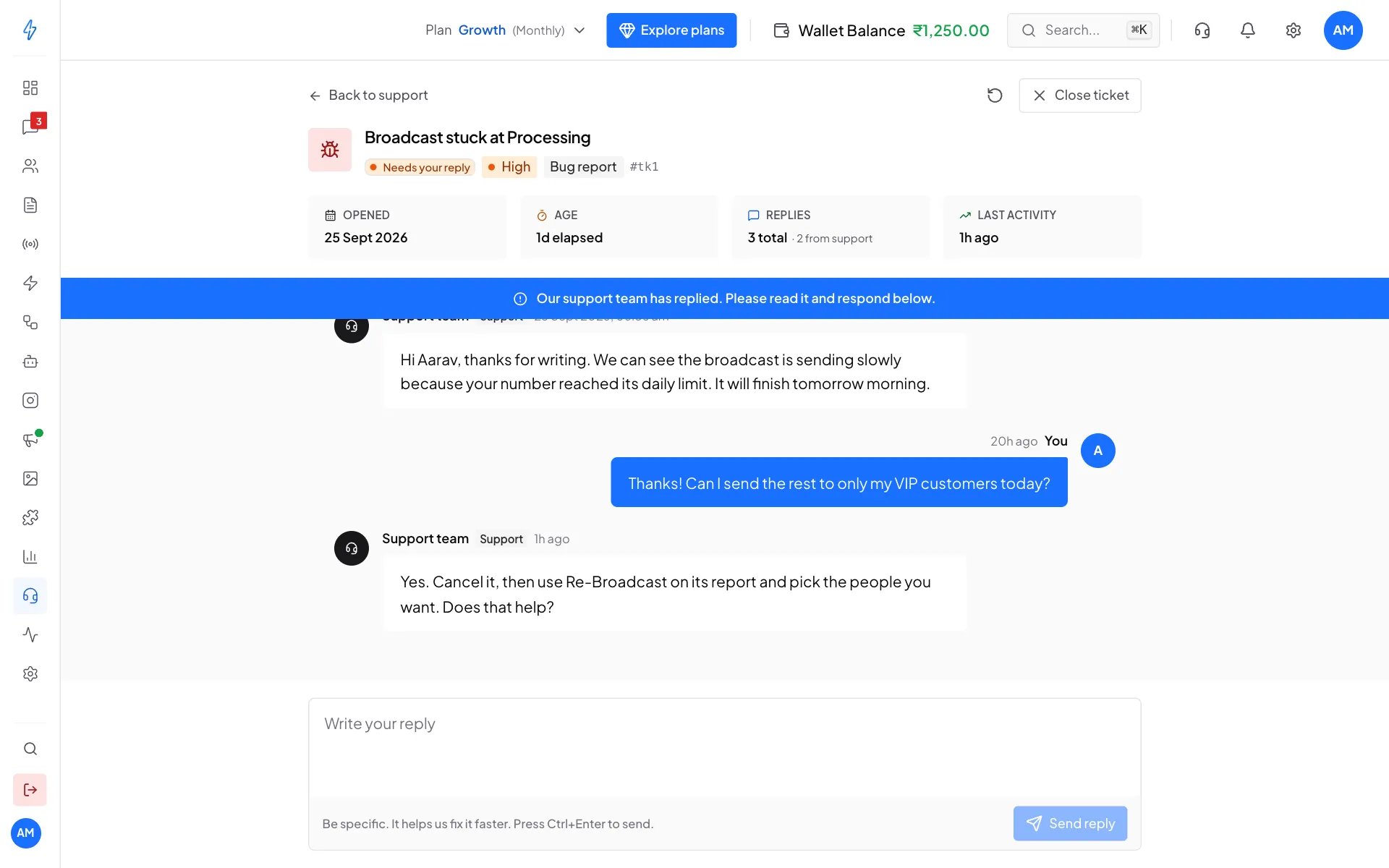
The conversation with our team
When your problem is solved, click Close ticket at the top right.
Attach screenshots and files
You can add files to a new ticket and to every reply. There are three ways:
- Click Attach files in the ticket form, or Attach under the reply box, and pick the files.
- Drag the files from your computer and drop them on the form or on the reply box.
- Take a screenshot, click in the form or the reply box, and paste it (Ctrl and V, or Cmd and V on a Mac).
Each file appears in a list with its name and size. A bar shows how much has uploaded.
- To take a file out before you send, click the X beside it.
- If a file says the upload failed, click Retry, or remove it.
- Submit ticket and Send reply stay off until every file has finished uploading.
In the conversation, the files show under the message they were sent with. Click a picture to see it large. A PDF opens in a new tab.
Only the people in your account who can use Support, and our support team, can open the files on your tickets.
Rate our support
When a ticket is closed, we email you once to ask how we did.
- Click a number from 1 to 5 in the email. A page opens with that score picked.
- Change the score if you like, and add a comment.
- Click Send rating. You can rate each ticket once.
Before you raise a ticket
Search this documentation first. Many answers are here, for example Broadcast reports for failed messages, or SMS troubleshooting.
Other ways to reach us
- Email: [email protected]
- In the app: click the headset icon in the top bar for more help options.