
Create a WhatsApp template
Write your message once, send it for approval, and then use it in chats and broadcasts. This guide covers every part of the form, from the name to the buttons. The preview on the right shows what customers will see as you type.
Step 1: Fill in the basics
Open Create Template
Click Templates in the left sidebar, stay on the WhatsApp tab, and click Create Template at the top right.
Pick the Template Category
Choose Marketing (offers and news), Utility (updates about an order or booking) or Authentication (login codes). Pick the one that really fits: a sale in a Utility template gets rejected.
Pick the Template Language
Open Select message language and pick the language the message is written in, for example English or Hindi. To send the same message in two languages, make two templates.
Type the Template Name
Use only small letters, numbers and underscores, for example
festive_offer_2026. No spaces or capital letters. Customers never see the name.Pick the Template Type
TEXT for a plain message, or IMAGE, VIDEO, DOCUMENT or LOCATION to show one at the top. CAROUSEL (Marketing only) shows 2 to 10 swipeable cards, and LIMITED TIME OFFER adds a countdown offer.
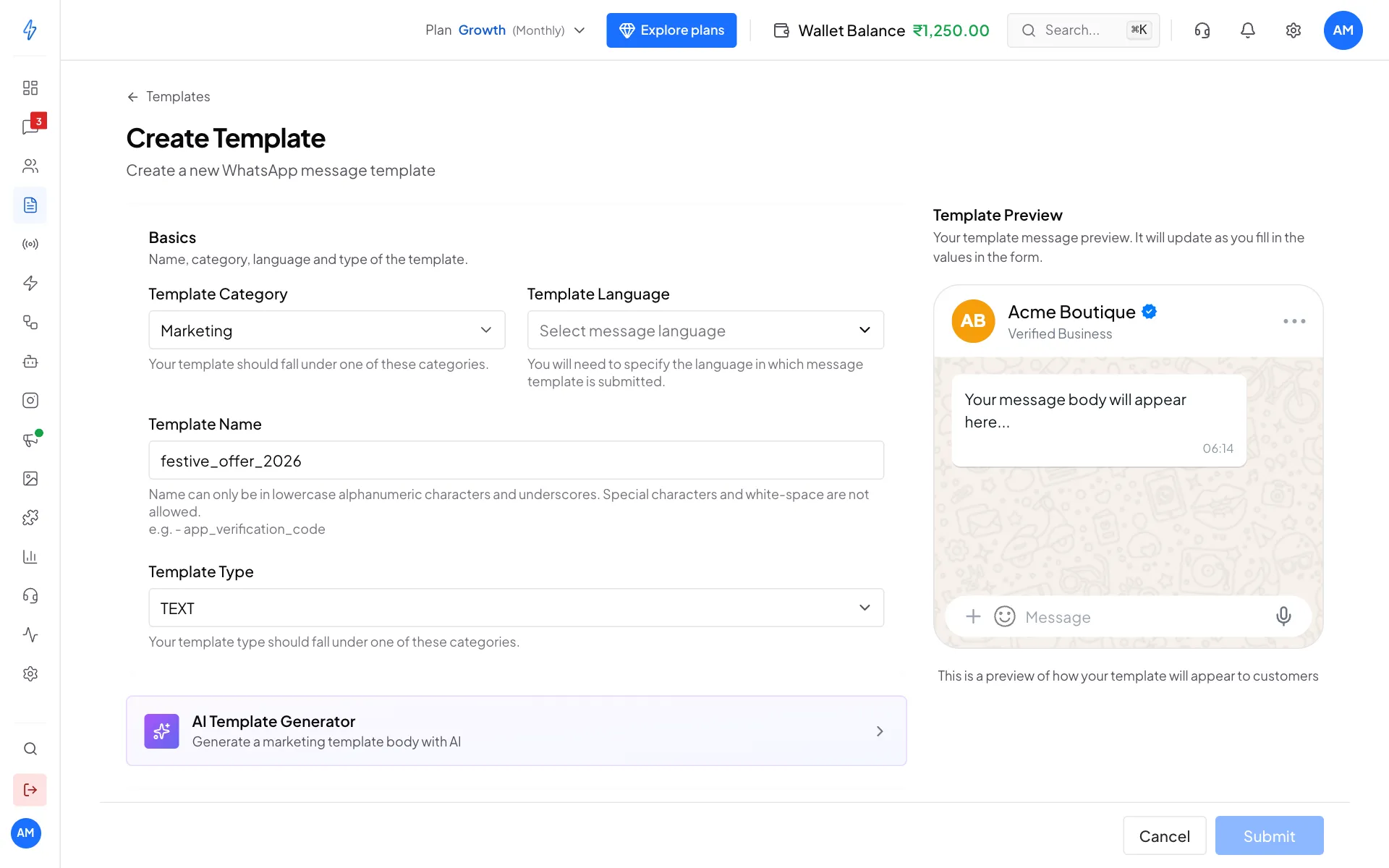
Category, language, name and type
Step 2: Add a header (optional)
For a TEXT template, type a short title in Template Header Text, up to 60 characters, for example Diwali sale is here. It shows in bold above the message.
For an IMAGE, VIDEO or DOCUMENT template, upload the file instead: JPEG or PNG up to 5 MB, MP4 up to 16 MB, or PDF up to 100 MB. It is only an example for the review. You can send a different picture each time you use the template.
Step 3: Write the body
Type your message
Type the message in Template Format, up to 1,024 characters. Use the buttons above the box for emoji, bold, italic and crossed-out text.
Add variables for the parts that change
Click + Variable where the customer's name or order number should go. It adds
{{1}}, then{{2}}, and so on. When you send, each variable is filled for each customer.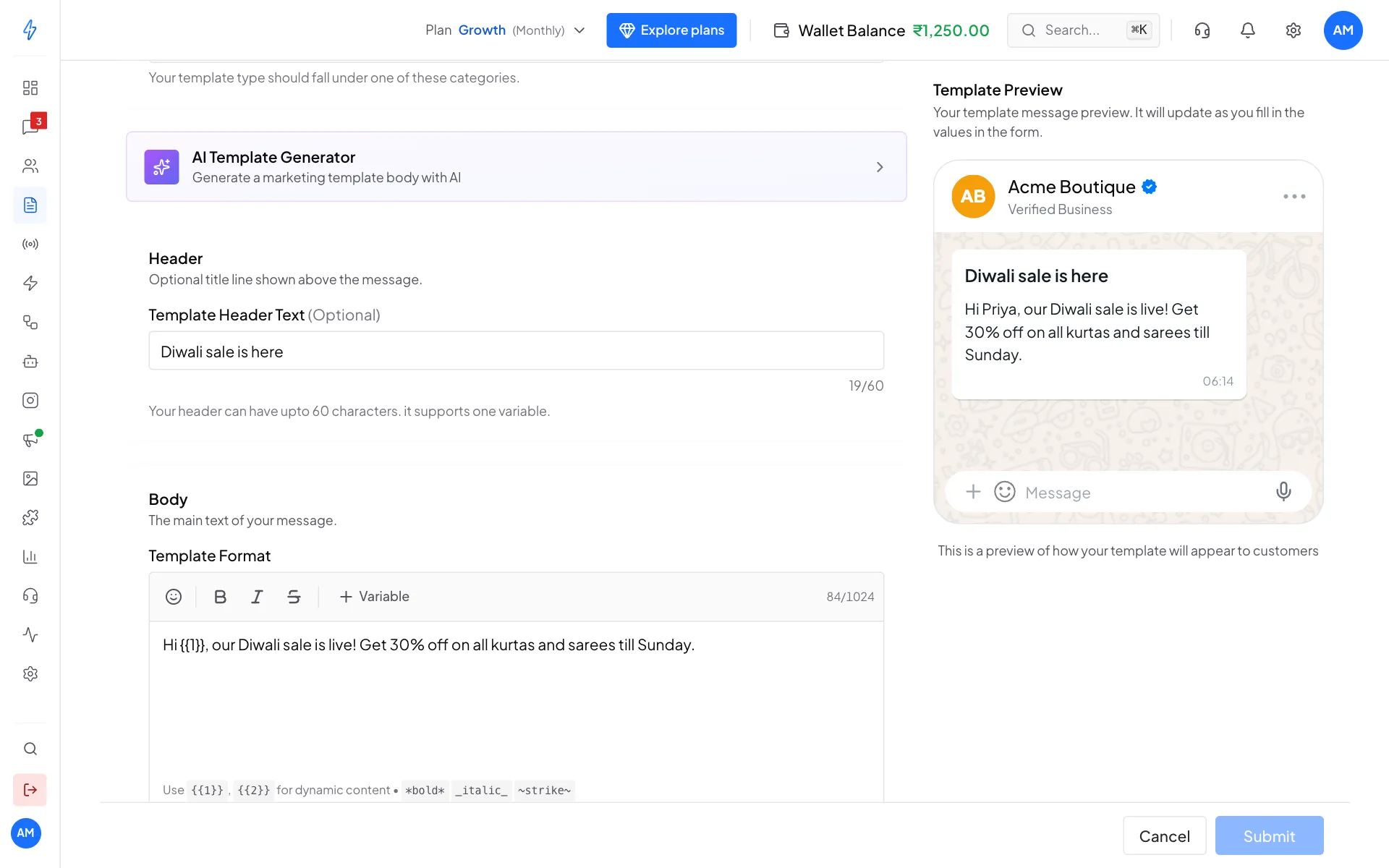
The preview fills in your sample values Fill in the Sample Values
Under Sample Values, type an example for each variable, for example
Priyafor{{1}}. WhatsApp's reviewers read the message with these examples, so make them realistic.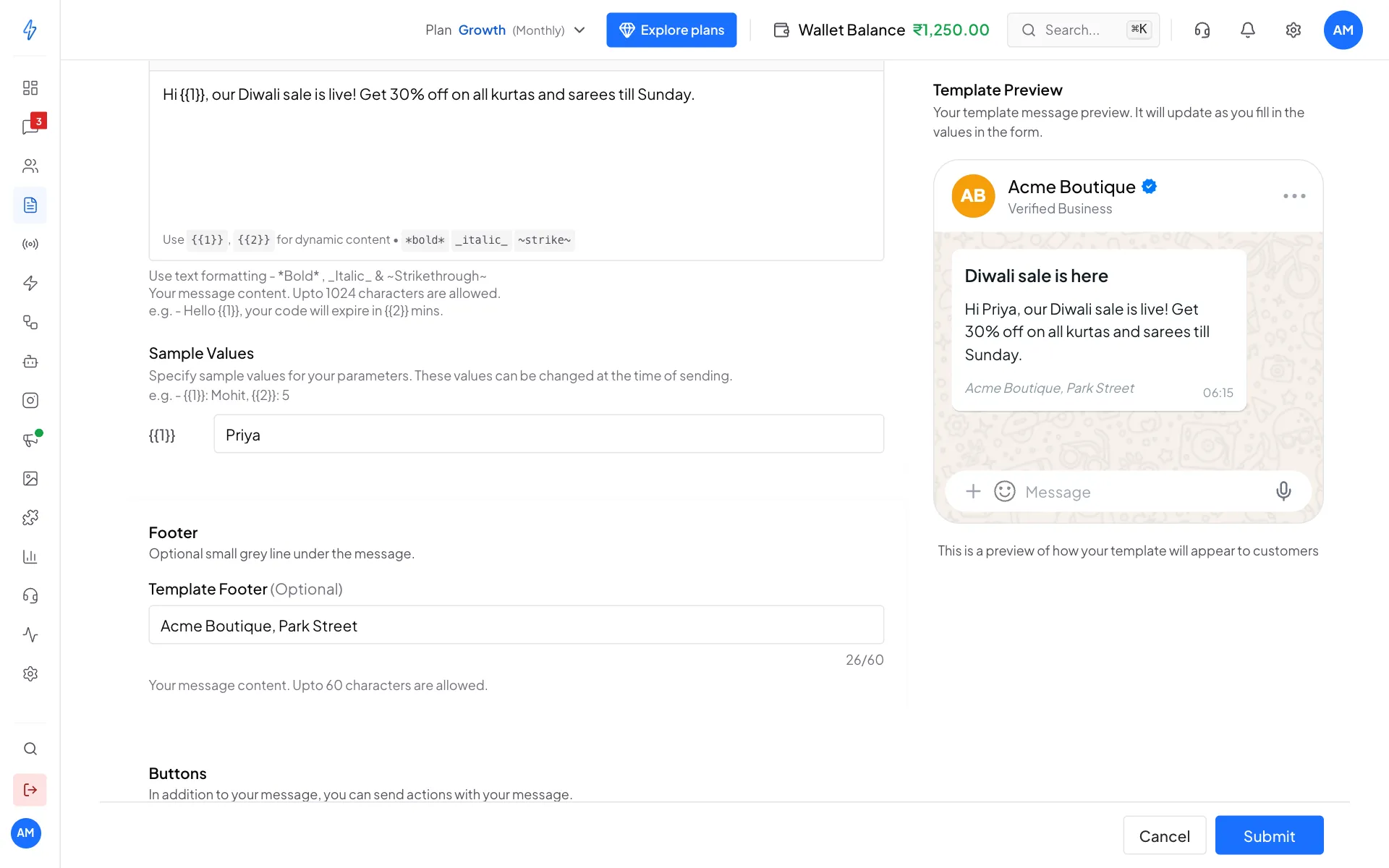
Give every variable a real-looking example
Step 4: Add a footer (optional)
Type a short grey line in Template Footer, up to 60 characters, for example your shop name or "Reply STOP to opt out".
Step 5: Add buttons (optional)
Under Buttons, pick one option:
Choose All
Click All. Buttons to add appear at the bottom: + Quick Replies, + URL, + Phone Number and + Copy Code. The small number on each is how many more you can add.
Add the buttons
Click a button type, then type its title, up to 25 characters. For URL, also type the web address. For Phone Number, pick the country code and type the number. For Copy Code, type the coupon code.
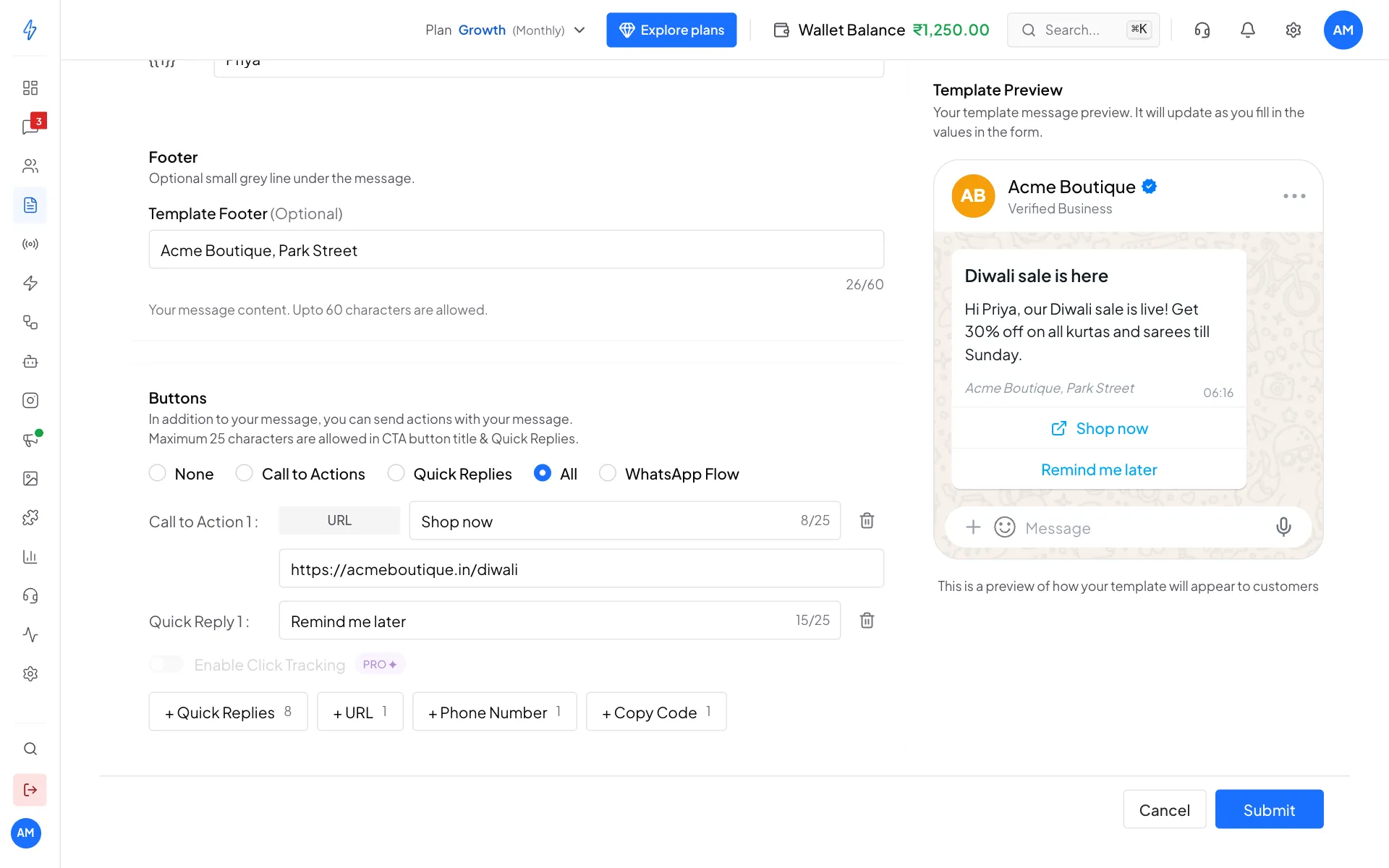
A link button and a quick reply Remove a button
Click the bin next to it.
You can have up to 10 buttons: up to 2 URL, 1 Phone Number, 1 Copy Code, and the rest quick replies. To put a variable at the end of a link, like https://acmeboutique.in/track/{{1}}, type it in the web address.
Add a WhatsApp Flow button
A Flow button opens a form inside WhatsApp, for example to book a trial slot.
- Click WhatsApp Flow.
- Open Select Form and pick the form. Only published forms are listed, because WhatsApp accepts only a published form in a template. Draft forms do not show here.
- Type the Button Text, for example
Book now(up to 25 characters).
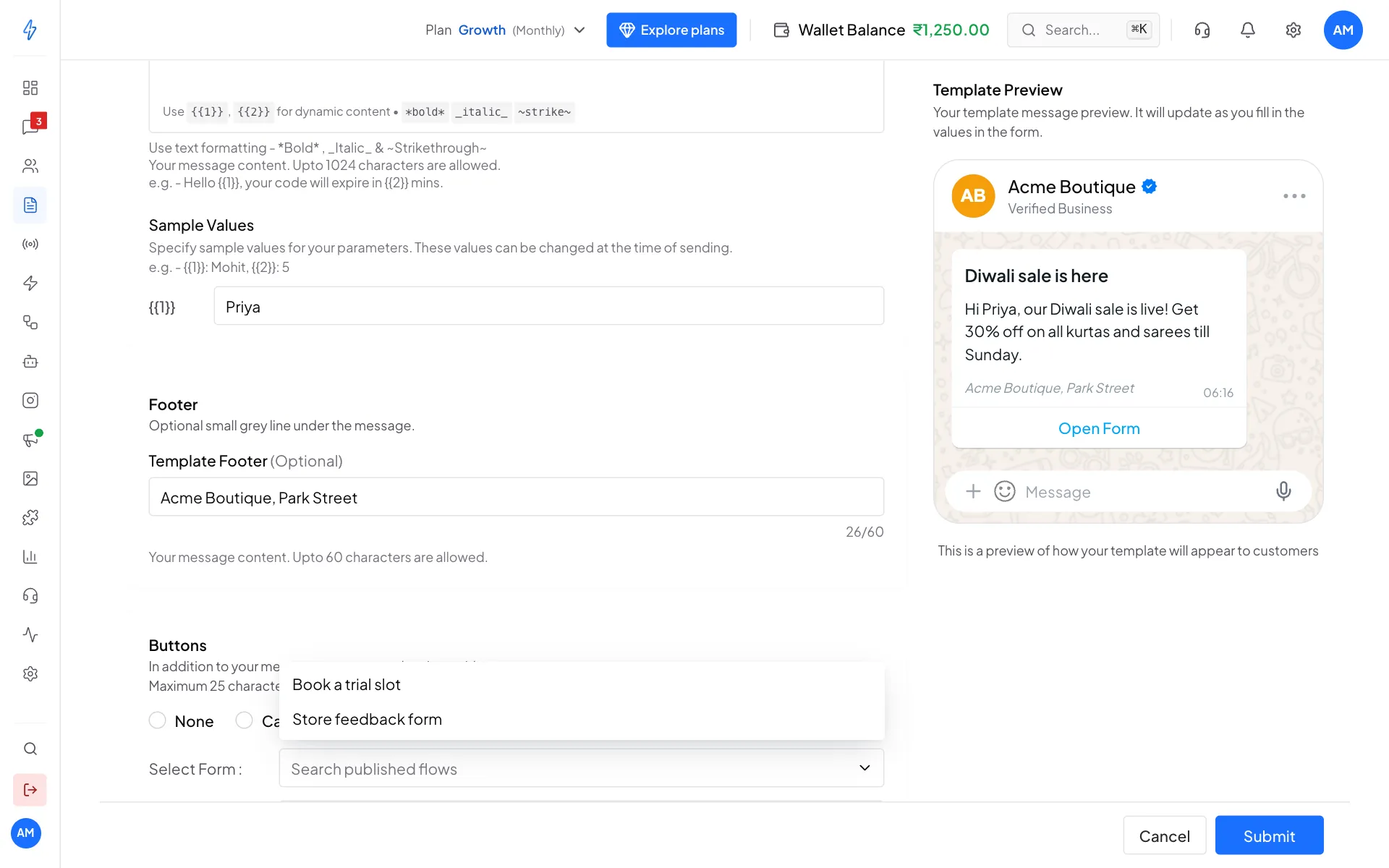
If you see No published flows yet, click Go to Flows and publish your form first. See WhatsApp Flows.
Step 6: Submit for approval
Check the Template Preview on the right, then click Submit at the bottom. You will see Template created! It may take some time for WhatsApp to approve it. The template shows as Pending in your list. Most templates are approved within 24 hours, and the status changes to Active.
Drafts: unsaved work is kept
While you fill in the form, it is saved as a draft on the device you are using, about a second after each change. Draft saved on this device shows in the bar at the bottom. If the browser closes, the computer turns off, the internet drops or you leave before you submit, the draft is listed under Drafts on this device at the top of the Templates page: click Continue to carry on or Delete to remove it. Opening Create Template again also shows a notice with Restore draft and Discard.
A restored draft is not sent anywhere until you click Submit. A draft stays in that browser on that device: it is not on your other devices, and your team members do not see it. A header file that had finished uploading comes back with the draft. A file that was still uploading, and the pictures or videos on carousel cards, are not kept: add them again. A template form has no secret fields, and secret fields are never kept in a draft.
Let AI write it for you (Marketing only)
Not sure what to write? For a Marketing template, open AI Template Generator below the basics.
Describe the message
In Write your prompt, say what you want, for example
Diwali sale, 30% off on kurtas and sarees till Sunday.Choose the style and goal
Under Choose your message style, pick Normal, Poetic, Exciting or Funny. Under Optimize your message for, pick Click Rate (a strong call to action) or Reply Rate (ends with a question).
Click Generate
Click Generate. You get a Header, a Body and Buttons. Below the button you see how many free generations you have left and the price after that, which comes from your wallet.
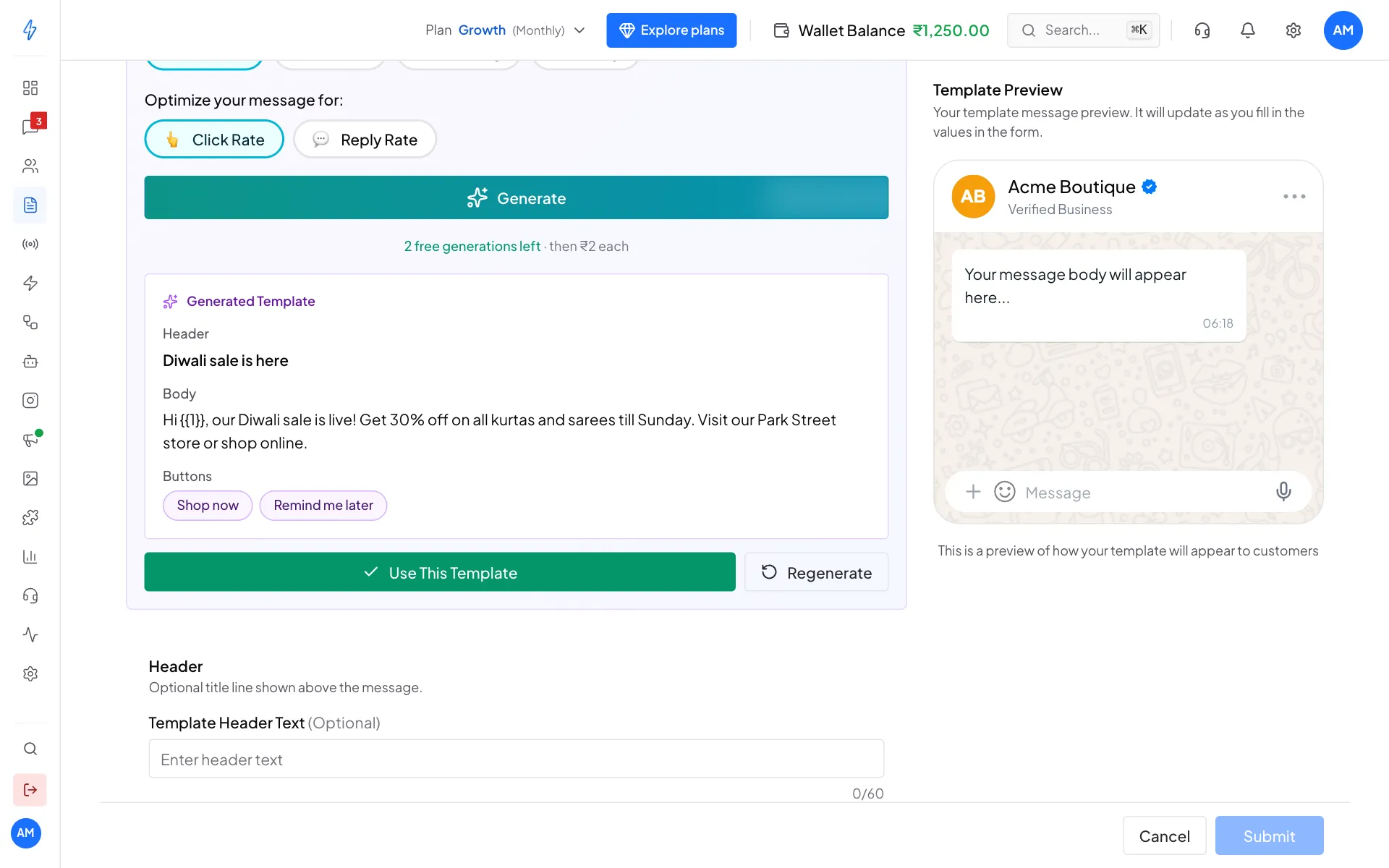
Use the result, or try again Use it
Click Use This Template to fill in the header, body and buttons, then change anything you like. Click Regenerate for a new version, or Previous prompts to reuse one of your earlier results for free.
Authentication templates
For Authentication, WhatsApp writes the message for you ("... is your verification code"). You can add an Expiration Warning (1 to 90 minutes) and Add Security Disclaimer. A Copy Code button is added by itself.
Tips for fast approval
If a template is rejected, open its menu on the Templates page, click Duplicate, fix it and submit it under a new name.