
Managed Ads
With managed ads you pick a daily rate, and we run your Click-to-WhatsApp ad on our ad account. Every reply arrives in your WhatsApp inbox like any other chat. You do not need a Meta ad account, a Business Manager or Ads Manager.
What you pay
You buy a daily rate, not a media budget. A ₹500 per day campaign costs ₹500 a day, and that is the whole price. Meta bills you nothing.
Managed ads are open to accounts outside India too. For an account in US dollars, the daily rate and the ad credits are in US dollars, for example $10 a day. The campaign form shows the lowest and highest daily rate you can use.
You are only charged for days the campaign actually runs. Pause it and the charging stops.
Charges come out of Ad credits, never your main wallet, so your message balance can never be spent on ads by accident.
Before you start
- A connected WhatsApp Business account. The ad opens a chat with your number.
- Ad credits for at least one day of your chosen rate.
- Your Facebook Page shared with us (see below), and linked to your WhatsApp number.
If something is missing, the Managed ads tab shows a short checklist: Connect WhatsApp, Add ad credits, Create your campaign.
Sharing your Facebook Page
The ad shows your Page's name and picture, not ours. Meta only lets us run it if your Page is shared with our business.
- Open Meta Business Settings, then Pages.
- Select your Page, then Partners, then Assign Partner.
- Enter our business ID (our support team gives you this).
- Allow Manage Page and Ads permissions.
The campaign wizard checks this before you launch and tells you if the Page is not reachable yet, so you find out at the start.
Link your WhatsApp number to the Page
Your Page must also have your WhatsApp number connected to it in Meta Business Settings. Meta rejects a Click-to-WhatsApp ad when the Page and the WhatsApp number are not linked.
Create a campaign
In the left sidebar, click CTWA Ads, then New campaign on the Managed ads tab. The wizard has five steps. See Create an ad.
Watch your campaigns
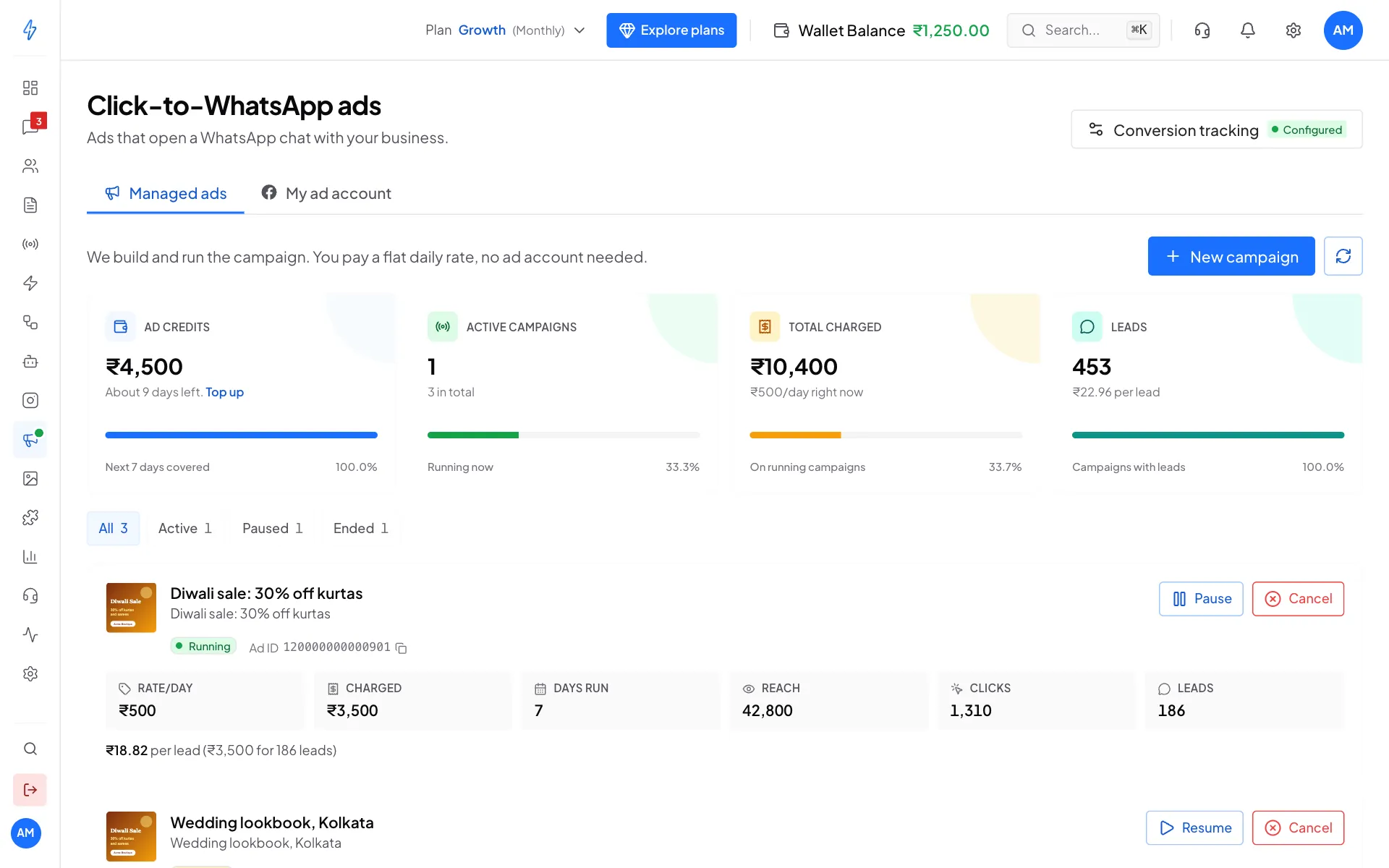
The four boxes at the top show your Ad credits (and about how many days they cover), Active campaigns, Total charged, and Leads (with the cost per lead). Use All, Active, Paused and Ended to filter the list.
Each campaign card shows:
- Rate/day: your daily rate
- Charged: the total taken so far
- Days run: how many days it has actually run
- Reach, Clicks and Leads
- The cost per lead, and the Meta Ad ID (copy it if you ever ask support about a specific ad)
Pause, resume or cancel
Pause
Click Pause on a running campaign. It stops running and no more days are charged. You can resume any time.
Resume
Click Resume on a paused campaign. You need at least one day's rate in ad credits. If you are short, the card says how much to add and links to Top up.
Cancel
Click Cancel, then Cancel campaign in the window that asks Cancel this campaign?. This is permanent: the campaign cannot be restarted, and you would create a new one instead. Nothing is charged after that day.
When ad credits run out
The campaign pauses on its own. It does not use your main wallet and does not run on credit. The card shows how much to add. Top up and click Resume.
Restricted categories
Some things cannot be advertised: loans and credit, cryptocurrency, gambling and betting, real-money gaming, adult content, tobacco and other regulated goods, and promises of guaranteed returns.
Campaigns are checked when you create them and again while they run. A flagged campaign shows Ads restricted with the reason and cannot be resumed. Create a new campaign with different wording. Meta also reviews every ad and may reject one for its own reasons, which shows the same way.