
SMS troubleshooting
Something not working with SMS? Find the message you see, or what happened, below. Each one says what it means and what to do.
The SMS was sent but never arrived
The app accepted the SMS, but the phone company can still drop it. The usual reasons:
Remember that the charge is not refunded when an SMS is not delivered. See Pricing and billing.
A template will not verify
- Template rejected: the phone company refused it. Check that the DLT template ID and the text match your portal exactly. Remove the template and add it again with the corrected details.
- Could not confirm: the test did not reach the phone. The number may be on Do Not Disturb, wrong, or switched off, or the test could not be done right now. Verify again, if possible with another number.
- Checking for a long time: the phone company has not answered yet. You can close the dialog. If it ends as Not confirmed, verify again.
- Verify is not shown: your SMS card is not Active yet, or sending is not open yet.
See SMS templates.
"Sending is not open yet"
SMS sending is not switched on for your account yet. You can still finish the setup and add your templates. Verifying templates and sending start as soon as sending opens. You do not need to do anything else.
"Your wallet balance is too low to send this message"
Your wallet cannot cover the SMS. Add funds and send again.
For a broadcast, the review shows Save without sending when your balance is too low. Save it, add funds, then click Start on it in the SMS broadcast list.
If a broadcast shows Stopped because your wallet ran out, add funds and create a new broadcast for the people who did not get it.
"This contact has opted out of your messages"
The contact opted out, so the SMS was not sent and nothing was charged. People who opted out are also left out of SMS broadcasts automatically. See Opt-Out Management.
"Only an owner or manager can change SMS settings"
You are signed in as an agent. Agents can send an SMS to a contact, but cannot change the SMS setup, add or remove templates, or run SMS broadcasts. Ask an owner or a manager of your account.
"That template is not approved yet"
Only Approved templates can send. Verify the template first.
"Broadcasts can only use a promotional template"
This is a DLT rule. Transactional and service SMS answer something the person did, such as placing an order, so they cannot be broadcast. Use an approved Promotional template for broadcasts.
"Nobody in that audience can receive SMS"
Everyone you picked was left out: they opted out, are blocked, do not have an Indian mobile number, or are missing a value for a variable. Pick other segments or tags, or set a fallback for your variables.
The SMS card says "Needs changes"
Our team found something to fix in your setup. The card shows the reason in a red box, for example that a sender ID is not registered under your entity.
Read the reason
Open Settings, Configure Channels and read the red box on the SMS card.
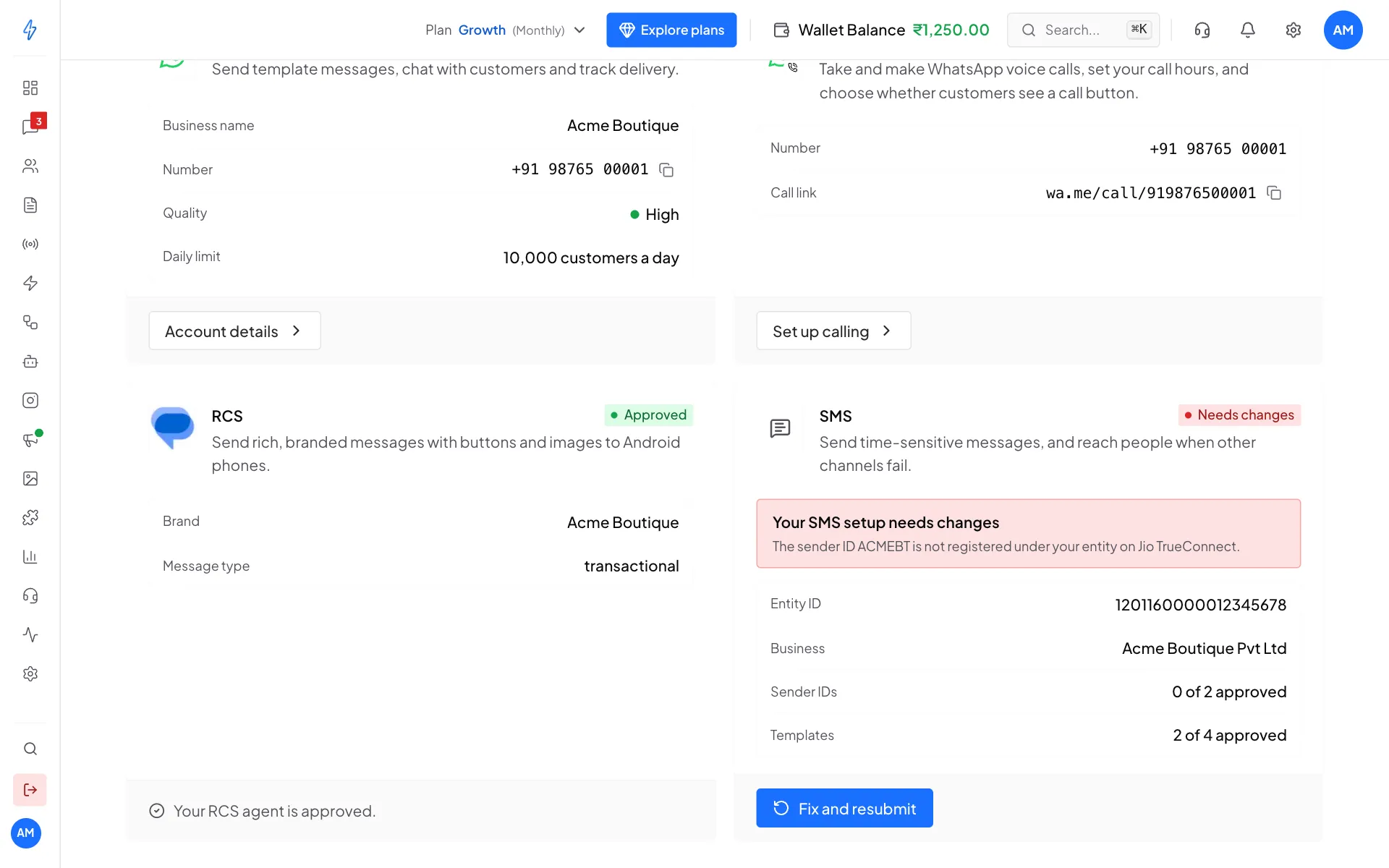
The card tells you what to fix Fix it on your DLT portal if needed
For example, register the sender ID under your entity on your DLT portal, or correct your Entity ID.
Fix and resubmit
Click Fix and resubmit, correct the details in the setup, and submit again. The card goes back to In review.
The SMS card says "Suspended"
SMS is suspended on your account. Please raise a support ticket.